Client Side development 2-RiWAs

content

  • Introduction to Rich Web-based Applications
  • Delta-Communication technologies
  • Architecture
  • SPDC/AJAX
  • Case study

Rich Internet Applications(RIAs) vs Rich web-based Applications

A rich Internet application (RIA) is a Web application designed to deliver the same features and functions normally associated with deskop applications. Furthermore RIAs generally split the processing across the Internet/network divide by locating the user interface and related activity and capability on the client side, and the data manipulation and operation on the application server side.

A rich web application is a Web application that has many of the characteristics of desktop application software, typically delivered by way of a site-specific browser, a browser plug-in, an independent sandbox, extensive use of JavaScript, or a virtual machine
Client side Development technologies

Rich and interactive portal web applications use a variety of technologies such as Ajax, JavaScript, JSON, and patterns such as REST. Moreover for developers these technologies and patterns allow to create increasingly responsive and highly interactive web applications.

Javascript

JavaScript is used to enable client-side interactivity. JavaScript is a loosely typed, compact, language that i web developers are commonly used. Moreover JavaScript has become widely adopted in recent years largely because new frameworks and best practices have proliferated. The emergence of JavaScript toolkits, such as Dojo, make client-side development easier while hiding many of the problems surrounding cross-browser compatibility.

AJAX

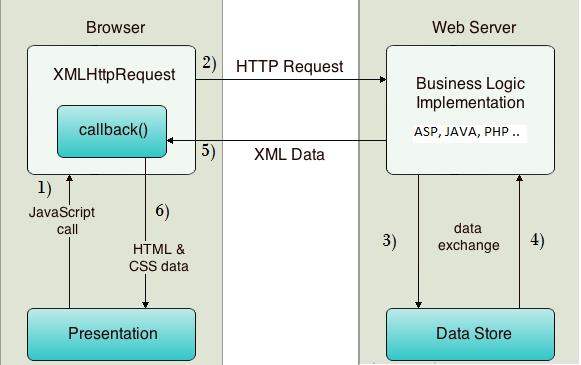
Ajax refers to a collection of standards-based and open source browser technologies. While a classic web application refreshes the entire web page with each response from the server,moreover an Ajax-enabled web application allows small amounts of data and UI markup to be returned from the server and rendered in the browser without refreshing the entire page.Furthermore to the user, an Ajax-enabled web application responds more smoothly and quickly than a traditional web application.

At the heart of Ajax is the XMLHttpRequest object. Moreover it is referred to as XHR, XMLHttpRequest is an HTTP request object that makes asynchronous (typically), incremental requests to the server. The JavaScript API for XMLHttpRequest is a key component of Ajax-style web applications. Furthermore this object allows the browser to respond to user events without reloading the entire page. For instance, a web application that allows users to explore folders in a content repository can be designed so that only the explorer part of the interface refreshes each time the user opens a folder.

Disk java script frame work

Disc is a WLP-specific, public JavaScript API for portlet development and interaction with the WLP rendering framework.Moreover Disc helps you write Ajax-enabled portlets and enable richly interactive web application features for your portal.

Portal-aware XMLHTTPREQUEST

When standard XHR objects are used in a portal environment, certain rendering, interportlet communication, and other problems can occur. XHR calls are scoped to an entire portal, while portal-aware XHR calls are scoped to individual portlets. A portal-aware XHR call retrieves some portion of a portlet’s content and of any other portlets that are affected.

The Disc API class, bea.wlp.disc.io.XMLHttpRequest, is an extension of the standard XMLHttpRequest class. WLP’s XMLHttpRequest allows you to make asynchronous, incremental calls to the portal server, and supports portal features such as interportlet communication and WSRP.

Web-based & Rest style services

Representational State Transfer, or REST, is an architectural style for interacting with resources at a given URL. A REST architecture is typically used to provide a simple HTTP interface to resources published on the web. Although a simplistic analogy, you can think of REST services as an easy-to-use equivalent to traditional web services.

The primary advantage of using REST style services with web applications, such as WebLogic Portal, is that REST allows the web application to access web-addressed data and UI directly from the browser interface. The REST model provides a loose coupling between the data and the UI. REST services are easy to invoke using an HTTP request from a browser.

WebLogic Portal provides a REST framework that exposes WLP data and methods as REST services which unlock data from a portal web application and allow the data to be shared between applications.

JSON

JavaScript Object Notation (JSON) is a data exchange format based on JavaScript. JSON is commonly used to pass objects between web clients and servers over HTTP. using JavaScript, JSON objects are easy to read and to manipulate .

AJAX Tool kit

You can use available JavaScript toolkits and frameworks with Disc. As an example, Dojo is a toolkit for DHTML and JavaScript browser programming. Dojo provides low-level IO (XMLHttpRequest), an event framework, JavaScript extensions, and a rich set of interface widgets such as buttons, lists, forms, and trees. for use in WLP portlets , Dojo works well.

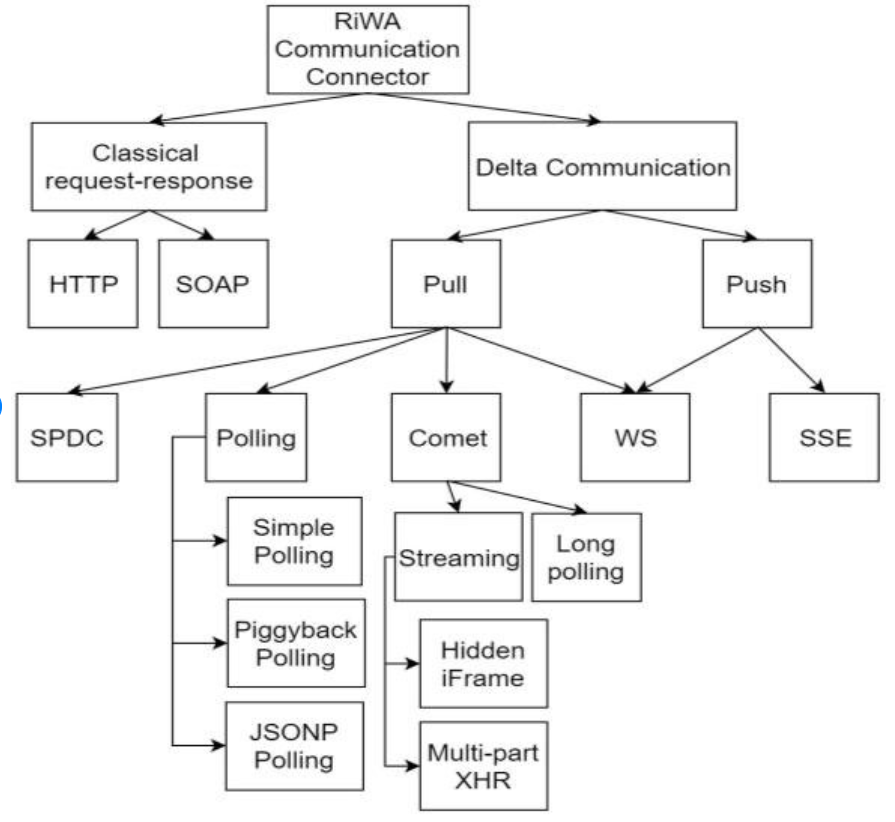
Delta communication

Simple Pull Delta-Communication is the basic abstract Delta-Communication technique, based on the data-pull mode.Moreover based on the request-response model; and this technique is technology independent , It describes the simplest form of data-pull Delta-Communication.

Asynchronous Transmission vs Synchronous Transmission

Asynchronous Transmission. In the case of asynchronous transmission, the data or signals being transmitted and received are not done in synchronization. Furthermore the time interval between the sending and receiving devices enable transmission and reception at their own pace.

The word synchronous refers to things happening at the same time. It is true for synchronous transmission within the context of information technology. Furthermore Synchronous transmission defined as the process by which data or a signal is transferred from one application system or device to another at constant periods or intervals, usually monitored by a clock. This means that the transmitting and receiving systems send and receive data at the same rate or speed. They are in sync. Example of this is copying data from one file location to another:

In this diagram, data is being transmitted from A to B, A being the sender and B being the receiver. A couple of sync data packets initialize the transmission process. The sync packets, once received by the receiver, are decoded and serve to synchronize the receiving clock with the sending clock. Sending and receiving commences, once synchronization is achieved .

XHR

XMLHttpRequest (XHR) is an API in the form of an object whose methods transfer data between a web browser and a web server.Moreover the object is provided by the browser’s JavaScript environment.
AJAX

AJAX stands for Asynchronous JavaScript and XML. AJAX is a new technique for creating better, faster, and more interactive web applications with the help of XML, HTML, CSS, and Java Script.  Along with Document Object Model and JavaScript for dynamic content display Ajax uses XHTML for content, CSS for presentation .

References

https://docs.oracle.com/cd/E15919_01/wlp.1032/e14229/ria.htm

https://pdfs.semanticscholar.org/e0a5/1711458fed342b19311f9f4928026bc264cf.pdf

https://www.tutorialspoint.com/ajax/what_is_ajax.htm

Client-Side Development 1 J query

Content

  • Introduction to the j query
  • j Query selectors
  • DOM,DOM navigation, and DOM objects
  • Event handling
  • Advanced features

J query ? framework or library.

framework is something that usually forces a certain way of implementing a solution, Moreover jQuery is just a tool to make implementing what is need to do easier. Furthermore jQuery defines “The Write Less, Do More”, JavaScript Library. It is just a single library.

Features provided by j query;

The jQuery library contains the following features,

  • HTML/DOM manipulation.
  • CSS manipulation.
  • HTML event methods.
  • Effects and animations.
  • AJAX.
  • Utilities.

Advantages and disadvantages of jquery.

The advantages of jQuery.

The main advantage of jQuery is that it is much easier than its competitors. plugins can be added easily, translating this into a substantial saving of time and effort.

The open source license of jQuery allows the library to always have constant and fast support, constantly publishing updates.

Excellent integration with AJAX is another advantage over Flash and pure css which are competitors of jQuery.

Disadvantages of JQuery

large number of published versions in the short time. It does not matter if you are running the latest version of jQuery, need to host the library yourself (and update it constantly), or download the library from Google (attractive, but can bring incompatibility problems with the code).

jQuery is easy to install and learn, initially. But it’s not that easy if we compare it with CSS

If jQuery is improperly implemented as a Framework, the development environment can get out of control.

J query selector

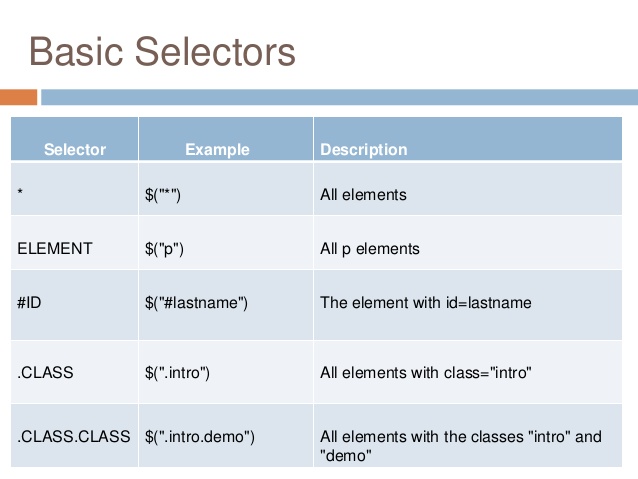
jQuery Selector is a function which makes use of expressions to find out matching elements from a DOM based on the given criteria. Simply, selectors are used to select one or more HTML elements using jQuery. Once an element is selected then we can perform various operations on that selected element.

DOM Objects

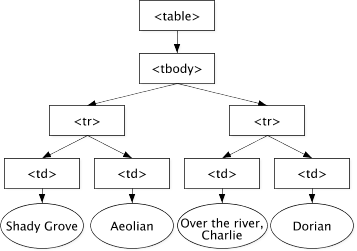
The Document Object Model (DOM) is a programming API for HTML and XML documents which defines the logical structure of documents and the way a document is accessed and manipulated. Furthermore, XML presents this data as documents, and the DOM may be used to manage this data.

DOM Model

Using a dhcp

As of jQuery 3.0, .bind() has been deprecated. It was superseded by the.on() method for attaching event handlers to a document since jQuery 1.7, so its use was already discouraged. For earlier versions, the .bind() method is used for attaching an event handler directly to elements.

Benifits of using jQuery event handling;

  • It will reduce the development time. 
  • Use it to add animation and even handling on your website.
  • jQuery simplifies HTML document traversing, event handling, animating, and Ajax interactions for rapid web development.

Commonly Used jQuery Event Methods

  • click() The click() method attaches an event handler function to an HTML element.
  • dblclick() The dblclick() method attaches an event handler function to an HTML element.
  • mouseenter()
  • mouseleave()
  • mousedown()
  • mouseup()
  • hover()
  • focus()

Advanced Features

Objects refers to the current object within the scope. It refers to the element the event has triggered on, inside event handlers.

  • Data attributes
  • Animation
  • Filters Css manipulation
  • Refactoring with DOM object
  • Target on specific elements with generic names

References

https://stackoverflow.com/questions/36427868/failed-to-execute-goal-org-apache-maven-pluginsmaven-surefire-plugin2-12test

https://www.lorecentral.org/2017/11/advantages-disadvantages-jquery.html

https://www.w3.org/TR/WD-DOM/introduction.html

Introduction To The Client-Side development

Content

  1. Introduction to client-side Elements
  2. View development
  3. component development

Client side elements

the main elements of client-side application components of distributed systems are;

  • Views- what users see (mostly GUIs)
  • controllers- contain event handers for the
  • client-model – Business logic and data

The basic elements of an HTML page are,

  • A text header, denoted using the <h1><h2><h3><h4><h5><h6> tags.
  • A paragraph, denoted using the <p> tag.
  • A horizontal ruler, denoted using the <hr> tag.
  • A link, denoted using the <a> (anchor) tag.
  • A list, denoted using the <ul> (unordered list), <ol> (ordered list) and <li> (list element) tags.
  • An image, denoted using the <img> tag
  • A divider, denoted using the <div> tag
  • A text span, denoted using the <span> tag

css

The Importance of CSS in Web Development,

Cascading Style Sheets which is commonly known as CSS, is an integral part of the modern web development process. Furthermore it is a highly effective HTML tool that provides easy control over layout and presentation of website pages by separating content from design

CSS selectors

  • Universal selector
  • Element Type Selector
  • ID selector
  • Class Selector
  • Descendant Combinator
  • Child Combinator
  • General Sibling Combinator.

New Features in CSS 3

  • CSS 3 Selectors. In addition to the selectors that were available in CSS2, CSS 3 introduces some new selectors.
  • CSS 3 Rounded Corners. Rounded corner elements can spruce up a website, but creating a rounded corner requires a designer to write a lot of code.
  • CSS 3 Border Image.
  • CSS 3 Box Shadow.
  • CSS 3 Text Shadow.

CSS Selectors,

  • Element selector

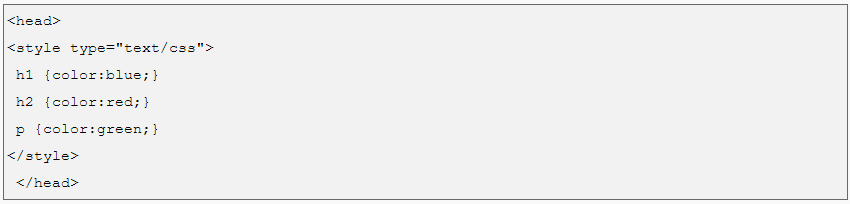
The element selector selects the HTML element by name.

Example;

  1. <!DOCTYPE html>  
  2. <html>  
  3. <head>  
  4. <style>  
  5. p{  
  6.     text-align: center;  
  7.     color: blue;  
  8. }   
  9. </style>  
  10. </head>  
  11. <body>  
  12. <p>This style will be applied on every paragraph.</p>  
  13. <p id=”para1″>Me too!</p>  
  14. <p>And me!</p>  
  15. </body>  
  16. </html>    
  • ID selector

The id attribute of an HTML element is selected by the id selector to select a specific element. Moreover an id is always unique within the page so it is chosen to select a single, unique element.

It is written with the hash character (#), followed by the id of the element.

example;

  1. <!DOCTYPE html>  
  2. <html>  
  3. <head>  
  4. <style>  
  5. #para1 {  
  6.     text-align: center;  
  7.     color: blue;  
  8. }  
  9. </style>  
  10. </head>  
  11. <body>  
  12. <p id=”para1″>Hello Javatpoint.com</p>  
  13. <p>This paragraph will not be affected.</p>  
  14. </body>  
  15. </html>    
  • class selector

The class selector selects HTML elements with a specific class attribute. It is used with a period character . (full stop symbol) followed by the class name.

example ;

  1. <!DOCTYPE html>  
  2. <html>  
  3. <head>  
  4. <style>  
  5. .center {  
  6.     text-align: center;  
  7.     color: blue;  
  8. }  
  9. </style>  
  10. </head>  
  11. <body>  
  12. <h1 class=”center”>This heading is blue and center-aligned.</h1>  
  13. <p class=”center”>This paragraph is blue and center-aligned.</p>   
  14. </body>  
  15. </html>  

Media Features,

ValueDescription
any-hoverDoes any available input mechanism allow the user to hover over elements? (added in Media Queries Level 4)
any-pointerIs any available input mechanism a pointing device, and if so, how accurate is it? (added in Media Queries Level 4)
aspect-ratioThe ratio between the width and the height of the viewport
colorThe number of bits per color component for the output device
color-gamutThe approximate range of colors that are supported by the user agent and output device (added in Media Queries Level 4)
color-indexThe number of colors the device can display
gridWhether the device is a grid or bitmap
heightThe viewport height
hoverDoes the primary input mechanism allow the user to hover over elements? (added in Media Queries Level 4)
inverted-colorsIs the browser or underlying OS inverting colors? (added in Media Queries Level 4)
light-levelCurrent ambient light level (added in Media Queries Level 4)
max-aspect-ratioThe maximum ratio between the width and the height of the display area
max-colorThe maximum number of bits per color component for the output device
max-color-indexThe maximum number of colors the device can display
max-heightThe maximum height of the display area, such as a browser window
max-monochromeThe maximum number of bits per “color” on a monochrome (greyscale) device
max-resolutionThe maximum resolution of the device, using dpi or dpcm
max-widthThe maximum width of the display area, such as a browser window
min-aspect-ratioThe minimum ratio between the width and the height of the display area
min-colorThe minimum number of bits per color component for the output device
min-color-indexThe minimum number of colors the device can display
min-heightThe minimum height of the display area, such as a browser window
min-monochromeThe minimum number of bits per “color” on a monochrome (greyscale) device
min-resolutionThe minimum resolution of the device, using dpi or dpcm
min-widthThe minimum width of the display area, such as a browser window
monochromeThe number of bits per “color” on a monochrome (greyscale) device
orientationThe orientation of the viewport (landscape or portrait mode)
overflow-blockHow does the output device handle content that overflows the viewport along the block axis (added in Media Queries Level 4)
overflow-inlineCan content that overflows the viewport along the inline axis be scrolled (added in Media Queries Level 4)
pointerIs the primary input mechanism a pointing device, and if so, how accurate is it? (added in Media Queries Level 4)
resolutionThe resolution of the output device, using dpi or dpcm
scanThe scanning process of the output device
scriptingIs scripting (e.g. JavaScript) available? (added in Media Queries Level 4)
updateHow quickly can the output device modify the appearance of the content (added in Media Queries Level 4)
widthThe viewport width

CSS – inline,internal, external;

CSS can be added to HTML elements in 3 ways;

  1. Inline – by using the style attribute in HTML elements.
  2. Internal – by using a <style> element in the <head> section.
  3. External – by using an external CSS file.

inline CSS,

Internal CSS

External CSS,

C

CSS Libraries/Design stuff;

Animate.css — Animation library

Flat UI Colors— List of simple and effective main colors

Material design lite— Framework based on Google’s material design

Materialui.co — Many resources for Material design framework

Colorrrs — Random color generator

Section separators — Css section dividers

Topcoat — Framework

Create ken burns effect — Ken burns effect using css3 animations

DynCSS — Add functions to css, to make it dynamic

Magic animations — Name speaks for itself

CSSpin — Collection of css spinners

Feather icons — Icons

Ion icons — Icons

Font awesome — Icons

Font generator — Combine multiple fonts and create a mixture

On/Off switch — Create on/off switch in css, good for check or radio buttons

UI Kit — Framework

Bootstrap — Framework

Foundation— Framework

Little Widgets— Html template collection

Frameworks to develop web pages;

  1. Ruby on Rails.
  2. Symfony.
  3. Angular JS.
  4. React.js.
  5. Asp.net.
  6. Node.js.
  7. Yii Framework.
  8. Meteor.

Plugins for develop web pages

Best Free WordPress Plugins for Your Website in 2019 (UPDATED)

  1. WPForms Lite. WPForms Lite is the most beginner friendly contact form plugin on the market today.
  2. MonsterInsights Lite. MonsterInsights Lite gives you a simple way to connect your WordPress website to your Google Analytics account.
  3. Google XML Sitemaps.
  4. Jetpack.
  5. Lazy Load by WP Rocket.
  6. W3 Total Cache.
  7. Yoast SEO.
  8. UpdraftPlus.

Tools for develpo web pages

The 7 Essential Tools For Frontend Web Development

  • Sublime Text.
  • Chrome Developer Tools.
  • jQuery.
  • GitHub.
  • Twitter Bootstrap.
  • Angular.js.
  • Sass.

New Features of JAVA SE 6.

  • Changes in I/O.
  • Collections Framework Enhancement.
  • Changes in jar and zip.
  • Java Web Start enhancements in version 6.
  • JMX API Enhancements.
  • Java Platform Debugger Architecture Enhancements.
  • Java SE 6 Monitoring and Management Enhancements.
  • New Package java.util.spi in JDK 6.

Browser-based clients’ components

comprises two main aspects

•Controllers

•Client-model

Using JS/JS-based frameworks, libraries, and plugins,
the components of browser-based clients are developed.

Frameworks/tools to develop the client-side components of browser-based applications.

FRAMEWORKS

Angular JS

A client-side framework, AngularJS incorporates user interface data binding. The data binding is bidirectional: whenever the model changes, the view is automatically updated. In turn, the model updates if the view is changed. The HTML is compiled in the browser and is rendered in the live view on the fly.

Ember JS

EmberJS is an application framework that works with the model-view-controller arrangement. Moreover you can build highly scalable, single-page apps by utilizing Ember’s two-way data binding, templates that update automatically, rich object model, computed properties and router for handling application state.

React JS

With ReactJS, data views are rendered automatically as HTML. This gives developers a system where data flows down, and subcomponents cannot alter enclosing modules. React is useful for creating single-page applications because it creates distinct separations between components on the page – the HTML is updated cleanly and efficiently when the data is changed.

Some common Client Side Scripting technologies:

  1. HTML (HyperText Markup Language)
  2. CSS (Cascading Style Sheets)
  3. JavaScript.
  4. Ajax (Asynchronous JavaScript and XML)
  5. jQuery (JavaScript Framework Library – commonly used in Ajax development)
  6. MooTools (JavaScript Framework Library – commonly used in Ajax development)

REFERENCES

https://www.javatpoint.com/

https://www.sitepoint.com/top-javascript-frameworks-libraries-tools-use/

https://www.sitepoint.com/top-javascript-frameworks-libraries-tools-use/

https://hackernoon.com/67-useful-tools-libraries-and-resources-for-saving-your-time-as-a-web-developer-7d3fb8667030

http://webreference.com/authoring/css3/index-2.html

https://www.w3schools.com/

https://www.google.com/

Data Persistence

Content,

  1. Introduction to data persistence.
  2. Data, Files, Databases, and DBMSs.
  3. Application to files/DB
  4. ORM
  5. NOSQL and Hadoop.
  6. Information retrieval.

Data

Data is any sort of information that is stored in computer memory. This information can
be used later for a website, an application or any other client to store for future purpose. The most common information is User information in the form of user personal, address and banking information. As an example consider Facebook, it stores our personal data, images, posts, comments and many more things. Moreover Banking application also stores user data, their transactions details, funds summary etc. All this information is data, but when it put together and store in a structural way, it becomes informational data.

Database

Database (DB) are organized, they have a structure, and all the data they store it fits into that structure. Moreover, a database is an electronic system that allows data to be stored,  easily accessed, manipulated and updated.

Databases are quite similar to spreadsheets because they are mostly made up of tables which contain rows and columns like a spreadsheet. A database needs to be hosted or created on some special database platform, some famous Database platforms are:

  • PostgreSQL
  • MySQL
  • Microsoft Access
  • SQLite

Database Management System

A database management system is a software used to perform different operations, like addition, access, updating, and deletion of the data, like adding your name in the database for an online retail store as a customer. Furthermore a database management system acts as the backbone of a database and makes using a database a cakewalk as it makes access and management of data a lot easier.

Database Server

Database server is the term used to refer to the back-end system of a database application using client/server architecture. The back-end, or a database server, performs tasks such as data analysis, storage, data manipulation, archiving, and other non-user specific tasks.

Files vs Databases

Difference Between File and Database

A data file is a collection of related records stored on a storage medium such as a hard disk or optical disc. While adatabase is a collection of data organized in a manner that allows access, retrieval, and use of that data.

Data arrangement

A Data Access Arrangement (DAA) is an electronic interface within a computer and its modem to a public telephone line. A DAA is also sometimes called a Telephone Line Interface Circuit (or Module). Moreover, An already-approved DAA design into the modem is built by
most manufacturers of modems and other devices.

Types of Database Management Systems

  • Hierarchical databases.
  • Network databases.

The network model is a database model conceived as a flexible way of representing objects and their relationships. Moreover its distinguishing feature is that the schema, viewed as a graph in which object types are nodes and relationship types are arcs, is not restricted to being a hierarchy or lattice.

  • Relational databases.

A relational database is a digital database based on the relational model of data, as proposed by E. F. Codd in 1970. A software system used to maintain relational databases is a relational database management system. Moreover Virtually all relational database systems use SQL for querying and maintaining the database.

  • Object-oriented databases.

An object database is a database management system in which information is represented in the form of objects as used in object-oriented programming. Object databases are different from relational databases which are table-oriented. Moreover Object-relational databases are a hybrid of both approaches.

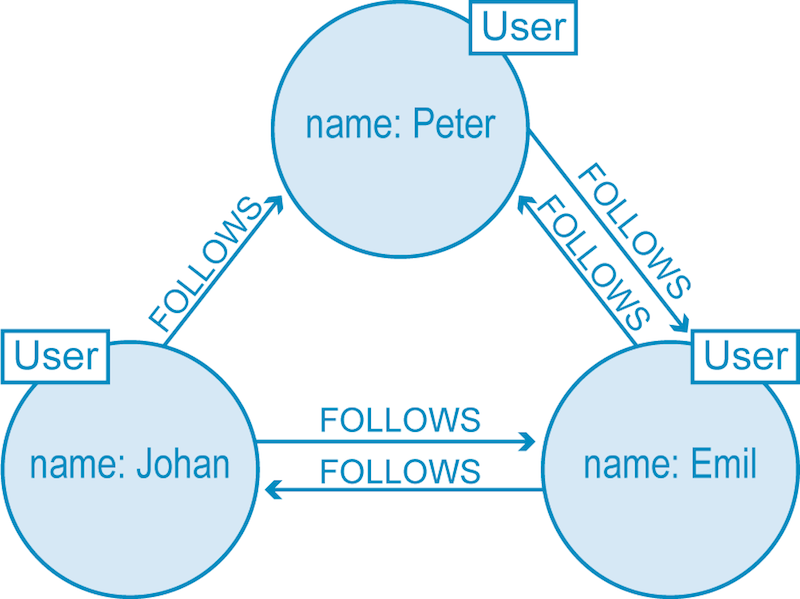
  • Graph databases.

In computing, a graph database is a database that uses graph structures for semantic queries with nodes, edges and properties to represent and store data.

  • ER model databases.
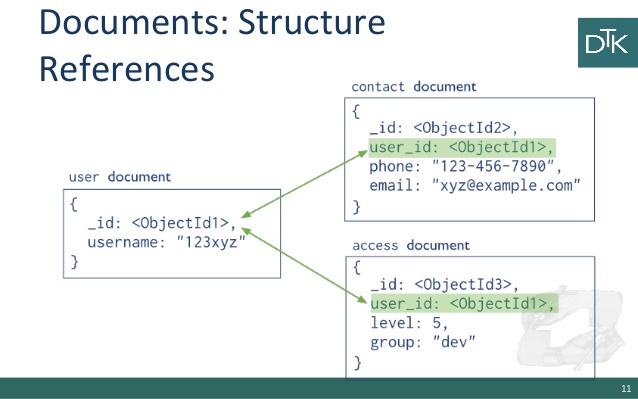
  • Document databases.

A document-oriented database, or document store, is a computer program designed for storing, retrieving and managing document-oriented information. It is also known as semi-structured data. 

Data warehouse with big data

Data warehouse means the relational database, therefore storing, fetching data will be similar with normal SQL query. And big data is not following proper database structure, we need to use hive or spark SQL to see the data by using hive specific query. 100% dataloaded into data warehousing are using for analytics reports.

To see more about data warehouse and big data visit;

https://www.educba.com/big-data-vs-data-warehouse/

Application component

A central concept for application architecture is Application Component. The following view shows this concept in detail.

The SQL statements, Prepared statements, and Callable statements ,

What is SQL?

As it is the special purpose domain specific language for querying the data in Relational Database Management System (RDBMS), SQL refers to Structured Query Language .

Microsoft SQL Server, MySQL, Oracle etc. use SQL for querying with slight syntax differences.

SQL Language

Types of SQL statements

SQL statements are categorized into four different type of statements,

  1. DML (DATA MANIPULATION LANGUAGE)
  2. DDL (DATA DEFINITION LANGUAGE)
  3. DCL (DATA CONTROL LANGUAGE)
  4. TCL (TRANSACTION CONTROL LANGUAGE)
SQL Language

Let’s see one by one.


DML

We have four different SQL statements, In Data Manipulation Language(DML) .

  1. SELECT

    Based on some condition, Select statement is used to select the collection of records from the table.

    E.g. select * from student – Get all the records of student table.

    Select * from student where rank>5 – Get the records with the condition where students’ rank is greater than 5.

  2. INSERT

    Insert statement is used to insert the set of values into the table.

    E.g. Insert into Student (Rank, StudentName, Mark) Values(1,’Kumar’,450)

  3. UPDATE

    Update statement is used to update the existing values in the table, which is based on some condition.

    E.g., update student set StudentName=’Manoj’ where StudentName=’Kumar’ 

    The query given above will update the studentName from Manoj to Kumar where student Name Kumar.

  4. DELETE

    Delete statement is used to delete the existing record in the table, which is based on some condition.

    Eg., Delete from Student where StudentName=’Manoj’

    The query given above will delete the record which has StudentName Manoj.

DDL

We have three different SQL statements, In Data Definition Language (DDL).

  1. CREATE 

    Create statement is used to create the new table in an existing database.

    Eg., Create Table Student (Rank Int,StudentName varchar(50),Mark Float)

  2. ALTER

    Alter statement can add a column, modify a column, drop a column, rename a column or rename a table.

    Eg., Alter Table Student Add (StudentAddress varchar (100))

  3. DROP

    SQL DROP TABLE statement is used to remove a table definition and all the data, indexes, triggers, constraints and permission specifications for the table.

    Eg, Drop Student

DCL

In Data Control Language(DCL), it defines the control over the data in the database. We have two different commands, which are

  1. GRANT

    Grant is allowed to do the specified user to the specified tasks.

    Syntax

    GRANT privilege_name
    ON object_name
    TO {user_name |PUBLIC |role_name} 
    [WITH GRANT OPTION];

  2. REVOKE

    It is used to cancel previously granted or denied permissions.

    Syntax

    REVOKE privilege_name
    ON object_name
    FROM {user_name |PUBLIC |role_name}

TCL

In Transaction Control Language (TCL), the commands are used to manage the transactions in the database. These are used to manage the changes made by DML statements. It also allows the statements to be grouped together into logical transactions.

  1. COMMIT

    Commit command is used to permanently save any transaction into the database.

    Syntax Commit;

  2. ROLLBACK

    Rollback command is used to restore the database for the last committed state. It’s also used with save point to jump to the save point.

    Syntax

    Rollback to save point name

  3. SAVEPOINT 

    Save point command is used to temporarily save a transaction, so that you can roll back to that point whenever necessary.

    Syntax

    savepointsavepoint-name;

Callable Statements

The CallableStatement interface allows the use of SQL statements to call stored procedures. Furthermore stored procedures are programs that have a database interface. These programs possess the following:

They can have input and output parameters, or parameters that are both input and output.

Prepared statements

In database management systems, a prepared statement or parameterized statement is a feature used to execute the same or similar database statements repeatedly with high efficiency.


ORM

Advantages of ORM.

Eliminating the hassle for developers, they write correct and optimized SQL queries . They make the code easier to update, maintain, and reuse as the developer can think of, and manipulate data as objects.

How ORM Works.

Object-relational mapping (ORM) is a technique (a.k.a. design pattern) of accessing a relational database from an object-oriented language (Java, for example). Hibernate is a big, powerful engine that makes a connection to the database, executes necessary SQL SELECT requests, and retrieves the data.

POJO

POJO stands for Plain Old Java Object. It is an ordinary Java object, furthermore not bound by any special restriction other than those forced by the Java Language Specification and not requiring any class path. PFor increasing the readability and re-usability of a program, POJOs are used .

A POJO should not:

  1. Extend prespecified classes, Ex: public class GFG extends javax.servlet.http.HttpServlet { … } is not a POJO class.
  2. Implement prespecified interfaces, Ex: public class Bar implements javax.ejb.EntityBean { … } is not a POJO class.
  3. Contain prespecified annotations, Ex: @javax.persistence.Entity public class Baz { … } is not a POJO class.

POJOs basically defines an entity. Like in you program, if you want a Employee class then you can create a POJO as follows:

JAVA Beans

JavaBeans are classes that encapsulate many objects into a single object (thebean). Moreover it is a java class that should follow following conventions:

Must implement Serializable. It should have a public no-arg constructor. Furthermore all properties in java bean must be private with public getters and setter methods.

They are used to encapsulate many objects into a single object (the bean), so that they can be passed around as a single bean object instead of as multiple individual objects. a Java Object that is serializable, has a nullary constructor, and allows access to properties using getter and setter methods is a JavaBean.

Moreover JavaBeans are reusable software components for Java. Practically, they are classes written in the Java programming language conforming to a particular convention.

JPA

The Java Persistence API is a Java application programming interface specification which describes the management of relational data in applications using Java Platform, Standard Edition and Java Platform, Enterprise Edition. 

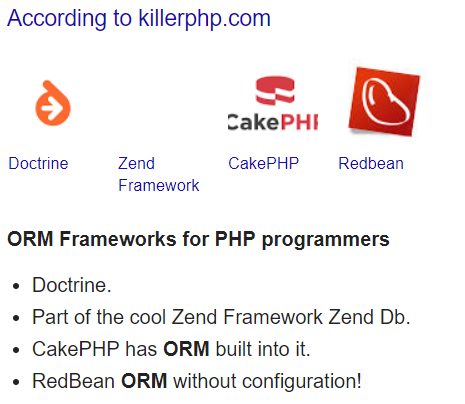
Java ORM Tools

  • Transparent persistence without byte code processing.
  • Object-oriented query language.
  • Object / Relational mappings.
  • Automatic primary key generation.
  • Object/Relational mapping definition.
  • HDLCA (Hibernate Dual-Layer Cache Architecture)
  • High performance.
  • J2EE integration.

Entity Developer is a powerful modeling and code generation tool for LinqConnect , Telerik Data Access, NHibernate, and ADO.NET Entity Framework. Can design an entity model from scratch or reverse-engineer an existing database. Furthermore the model is used to generate C# or Visual Basic code with predefined or custom code templates.

dotConnect is an enhanced data connectivity solution built over ADO.NET architecture and a development framework with a number of innovative technologies and support for such ORM solutions as Entity Framework and LinqConnect. dotConnect includes high performance data providers for the databases and cloud applications and offers a complete solution for developing data-related applications and web sites.

LINQ Insight is a powerful Visual Studio add-in for LINQ development that allows you to execute LINQ queries at design time directly from Visual Studio without starting a debug session and provides a powerful ORM profiler for Entity Framework, NHibernate, LINQ to SQL, and LinqConnect. Moreover it profiles the data access layer of your projects and tracks all the ORM calls and SQL queries from the ORM.

LinqConnect – a fast and easy to use ORM solution, it has developed closely to the Microsoft LINQ to SQL technology. Moreover In addition to LINQ to SQL features, LinqConnect provides its own advanced functionality. Moreover LinqConnect supports SQL Server, Oracle, MySQL, PostgreSQL, and SQLite.

NoSQL

A traditional database product would prefer more predictable, structured data. To expand as data or processing requirements grow, A relational database may require vertical and, sometimes horizontal expansion of servers. NoSQL is a whole new way of thinking about a database. Moreover NoSQL is not a relational database.

Advantages,

  • Large volumes of structured, semi-structured, and unstructured data.
  • Agile sprints, quick iteration, and frequent code pushes.
  • Object-oriented programming that is easy to use and flexible.
  • Efficient, scale-out architecture instead of expensive, monolithic architecture.

There are 4 basic types of NoSQL databases:

  • Key-Value Store – It has a Big Hash Table of keys & values {Example- Riak, Amazon S3 (Dynamo)}
  • Document-based Store- It stores documents made up of tagged elements. …
  • Column-based Store- Each storage block contains data from only one column, {Example- HBase, Cassandra}

Hadoop

Simply, Hadoop can be thought of as a set of open source programs and procedures (meaning essentially they are free for anyone to use or modify, with a few exceptions) which anyone can use as the “backbone” of their big data operations.

Core Hadoop Components

  • 1) Hadoop Common-
  • 2) Hadoop Distributed File System (HDFS) –
  • HDFS Use Case-
  • MapReduce Use Case:
  • Key Benefits of Hadoop 2.0 YARN Component-
  • YARN Use Case:
  • Pig Use Case-
  • Hive Use Case-

IR

Information retrieval is the activity of obtaining information system resources relevant to an information need from a collection. Moreover Searches can be based on full-text or other content-based indexing.

Tools for IR

http://www2.compute.dtu.dk/~pcha/IRtools/

REFERENCES

https://www.webopedia.com/TERM/D/database_server.html,

https://www.google.com/search?ei=6ECuXKihA4ui-QbxyajgAw&q=different+data+arrangements+&oq=different+data+arrangements+&gs_l=psy-ab.3…6852.14443..15263…1.0..0.129.1523.0j13……0….1..gws-wiz…….0i71j35i39j0j0i7i30j0i8i7i30.Sz7OjCAHX4Ahttps://www.educba.com/big-data-vs-data-warehouse

https://www.c-sharpcorner.com/blogs/types-of-sql-statements-with-example

https://www.geeksforgeeks.org/pojo-vs-java-beans/

https://www.devart.com/orm-solutions.html

https://www.bernardmarr.com/default.asp?contentID=1080 http://www2.compute.dtu.dk/~pcha/IRtools/

Server-Side Development 2 Rest

Content

  1. Introduction to REST
  2. Elements of REST style
  3. RESTful URLs
  4. Use MVC with REST & RESTful web services

Message Oriented Communication


Message-oriented communication is a way of communicating between processes. Messages, which correspond to events, are the basic units of data delivered. Tanenbaum and Steen classified message-oriented communication according to two factors—synchronous or asynchronous communication, and transient or persistent communication. In synchronous communication, the sender blocks waiting for the receiver to engage in the exchange. Asynchronous communication does not require both the sender and the receiver to execute simultaneously. So, the sender and recipient are loosely-coupled. The amount of time messages are stored determines whether the communication is transient or persistent. Transient communication stores the message only while both partners in the communication are executing. If the next router or receiver is not available, then the message is discarded. Persistent communication, on the other hand, stores the message until the recipient receives it.

Resource Oriented Communication

ROA is considered a RESTful architecture.  As an architectural style that exploits the existing technology and protocols of the Web, including HTTP and XML,  REST (representational state transfer) is defined by Roy Fielding, co-author of the HTTP specification and co-founder of the Apache HTTP server project,

In that ROA concept, resources include not only IT infrastructure elements such as servers, computers and other devices, but also Web pages, scripts and JSP/ASP pages, and other entities such as traffic lights.

REST Architecture style


REST Architectural Constraints. REST stands for Representational State Transfer, a term coined by Roy Fielding in 2000. It is an architecture style for designing loosely coupled applications over HTTP, that is often used in the development of web services.

“Representation” in REST

In REST-speak, a client and server exchange representations of a resource, which reflect its current state or its desired state. Further more , a way for two machines to transfer the state of a resource via representations, is REST, or Representational state transfer .

REST Architectural constraints,

REST stands for Representational State Transfer,which is a term coined by Roy Fielding in 2000. Furthermore it is an architecture style for designing loosely coupled applications over HTTP, which is often used in the development of web services.

The formal REST constraints are ,

  • Client–server architecture.
  • Statelessness.
  • Cacheability.
  • Layered system.
  • Code on demand (optional)
  • Uniform interface.
  • Relationship between URI and HTTP methods.

RESTful API,

A RESTful API is an application program interface (API) which uses HTTP requests to GET, PUT, POST and DELETE data.

Moreover it referred to as a RESTful web service based on representational state transfer (REST) technology, an architectural style and approach to communications often used in web service development.

Furthermore REST technology is generally preferred to the more robust Simple Object Access Protocol (SOAP) technology because REST leverages less bandwidth, making it more suitable for internet usage. Moreover an API for a website is code that allows two software programs to communicate with each another . Moreover the API spells out the proper way for a developer to write a program requesting services from an operating system or other application.

How RESTful API works

A RESTful API breaks down a transaction to create a series of small modules. moreover each module addresses a particular underlying part of the transaction. Even though it can be challenging for developers to design from scratch, this modularity provides developers with a lot of flexibility . Currently, the the most popular ones are models provided by Amazon Simple Storage Service, Cloud Data Management Interface and OpenStack Swift .

Advantages of RESTful Services

REST provides superior performance, particularly through caching for information that’s not altered and not dynamic. Furthermore REST is the protocol used most often for major services such as Yahoo, E bay, Amazon, and even Google. REST is generally faster and uses less bandwidth.

There are created 4 files for hello world JAX-RS example:

  1. Hello.java
  2. web.xml
  3. index.html
  4. HelloWorldClient.java

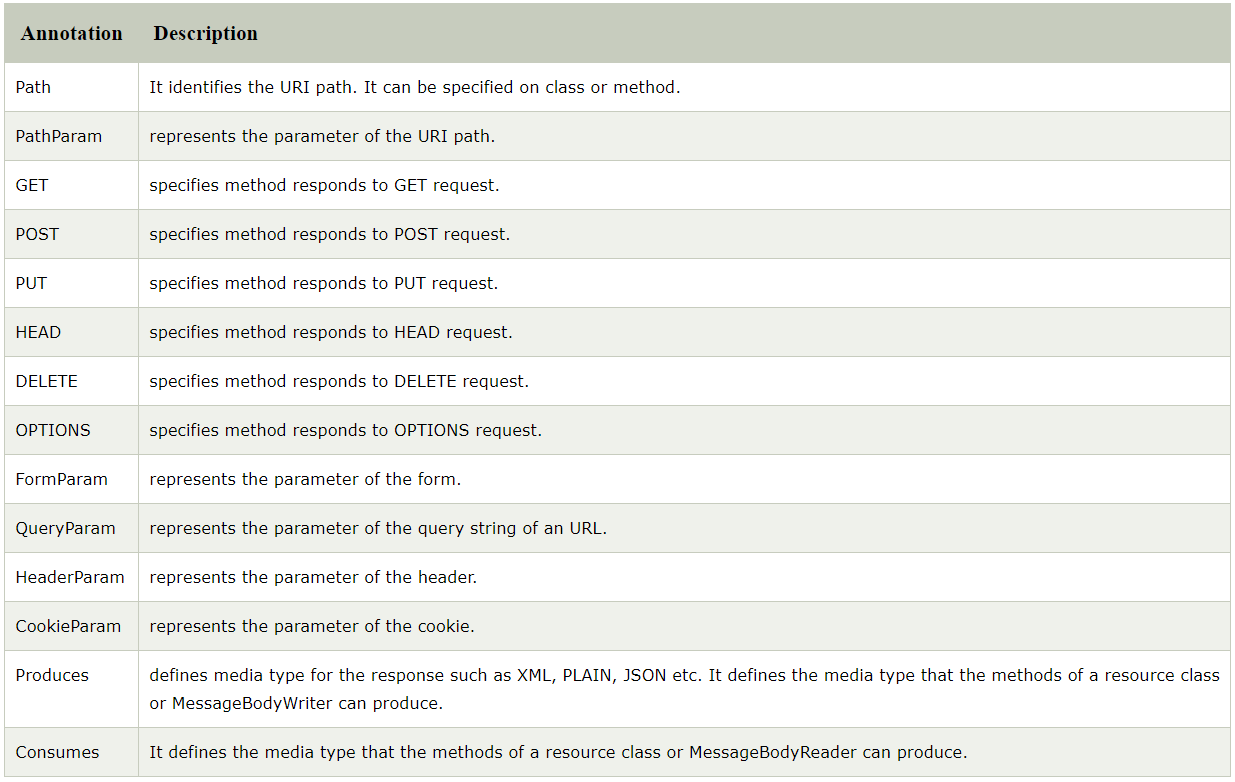
Annotations in JAX-RS

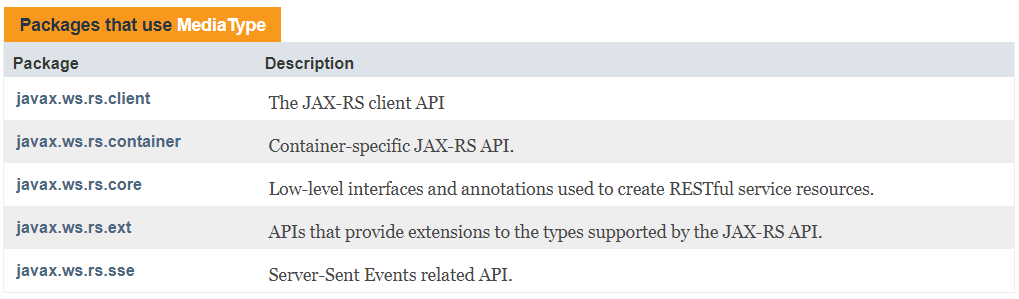
Media type in JAX-RS

REFERENCES

https://searchmicroservices.techtarget.com/definition/RESTful-API

https://www.javatpoint.com/jax-rs-annotations-example

https://javaee.github.io/javaee-spec/javadocs/javax/ws/rs/core/class-use/MediaType.html

Server-Side Development 1 SOAP

Content

  • Introduction to the web services
  • WSDL
  • SOAP
  • Implement SOAP Services

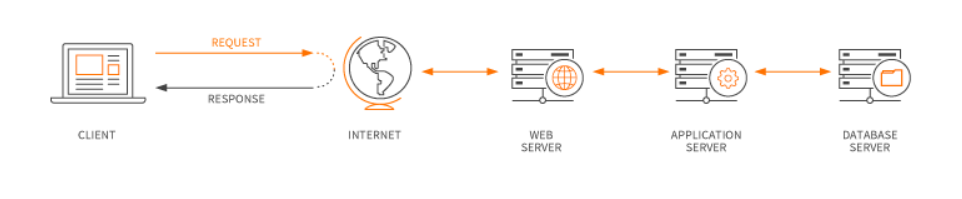
Web Application VS Web Services

Web application

Is a computer program that utilizes web browsers and web technology to perform tasks over the internet.

Web services

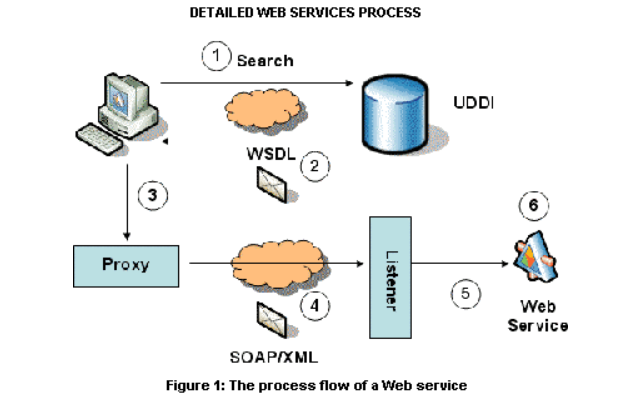
The term Web services describes a standardized way of integrating Web-based applications using the XMLSOAPWSDL and UDDIopenstandards over an Internet protocolbackbone. XML is used to tag the data, SOAP is used to transfer the data, WSDL is used for describing the services available and UDDI is used for listing what services are available. Used primarily as a means for businesses to communicate with each other and with clients, Web services allow organizations to communicate data without intimate knowledge of each other’s IT systems behind the firewall.

It works like this:

  • The account registration information into a SOAP message is bundled by the client program .
  • As the body of an HTTP POST request, this SOAP message is sent to the Web Service .
  • The Web Service unpacks the SOAP request and converts it into a command that the application can understand.
  • The information is processed by the application as required and responds with a new unique account number for that customer.
  • Next, the Web Service packages up the response into another SOAP message, which
    in response to its HTTP request, it sends back to the client program.
  • To obtain the results of the account registration process, the client program unpacks the SOAP message .

WSDL,

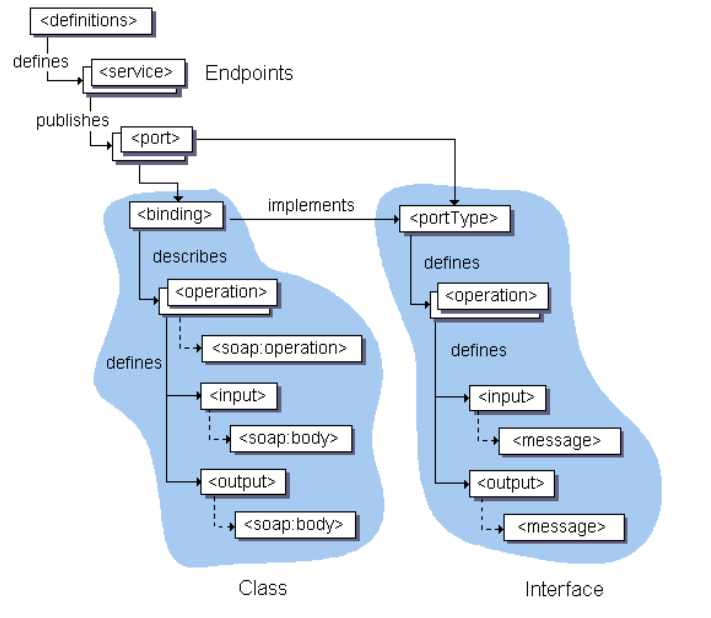
As a set of endpoints operating on messages containing either document-oriented or procedure-oriented information, WSDL is an XML format for describing network services . The operations and messages are described abstractly, furthermore bound to a concrete network protocol and message format to define an endpoint. Abstract endpoints (services)
are combined into related concrete endpoints. regardless of what message formats or network protocols are used to communicate, WSDL is extensible to allow description of endpoints and their messages .

Furthermore WSDL describes the public interface to the Web service.To provide Web services over the Internet, WSDL is often used in combination with SOAP and an XML Schema.
To determine what operations are available on the server, a client program connecting to a Web service can read the WSDL file.

SOAP and WSDL are related and complementary standards for web services, furthermore they are typically used together. WSDL is a service description language, moreover it describes the interface of the service,the structure of the XML messages that the service can accept.

Structure of a WSDL doccument ,

Eliments of a WSDL document

A WSDL document has a definitions element which contains the other five elements, types, message, port Type, binding and service. The features of the generated client code are described by the following sections

WSDL supports the XML Schemas specification (XSD) as its type system. Furthermore definitions contains the definition of one or more services. JDeveloper generates the following attribute declarations for this section:

  • name is optional.
  • targetNamespace is the logical namespace for information about this service. WSDL documents can import other WSDL documents, and setting targetNamespace to a unique value ensures that the namespaces do not clash.
  • xmlns is the default namespace of the WSDL document, and it is set to http://schemas.xmlsoap.org/wsdl/.
  • All the WSDL elements, such as <definitions><types> and <message> reside in this namespace.
  • xmlns:xsd and xmlns:soap are standard namespace definitions that are used for specifying SOAP-specific information as well as data types.
  • xmlns:tns stands for this namespace.
  • xmlns:ns1 is set to the value of the schema targetNamespace, in the <types> section.

Notice that the default of http://tempuri.org in namespaces to ensure that the namespaces are unique.

  • types

Information about any complex data types used in the WSDL document is provided by types. The document does not need to have a types section, when simple types are used .

  • message

An abstract definition of the data being communicated. Furthermore in the example, the message contains just one part, response, which is of type string, where string is defined by the XML Schema.

  • operation

An abstract description of the action supported by the service.

  • portType

An abstract set of operations supported by one or more endpoints.

  • binding

Describes how the operation is invoked by specifying concrete protocol and data format specifications for the operations and messages.

  • port

Specifies a single endpoint as an address for the binding, thus defining a single communication endpoint.

  • service

Specifies the port address of the binding. The service is a collection of network endpoints or ports.

Further details on Port Types-

The <portType> element combines multiple message elements to form a complete one-way or round-trip operation.

As an example, a <portType> can combine one request and one response message into a single request/response operation. Furthermore this is most commonly used in SOAP services. Moreover portType can define multiple operations.

Ex;

<portType name = "Hello_PortType">
   <operation name = "sayHello">
      <input message = "tns:SayHelloRequest"/>
      <output message = "tns:SayHelloResponse"/>
   </operation>
</portType>
  • The portType element defines a single operation, called sayHello.
  • The operation consists of a single input message SayHelloRequest and an
  • output message SayHelloResponse.

Port types-Method Summary

 void addOperation(Operation operation) 
          Add an operation to this port type.
 org.w3c.dom.Element getDocumentationElement() 
          Get the documentation element.
 Operation getOperation(java.lang.String name, java.lang.String inputName, java.lang.String outputName) 
          Get the specified operation.
 java.util.List getOperations() 
          Get all the operations defined here.
 QName getQName() 
          Get the name of this port type.
 boolean isUndefined() 
           
 void setDocumentationElement(org.w3c.dom.Element docEl) 
          Set the documentation element for this document.
 void setQName(QName name) 
          Set the name of this port type.
 void setUndefined(boolean isUndefined) 

Binding VS Service elements in WSDL

The binding element of a WSDL file describes how the service is bound to the SOAP messaging protocol. There are two possible SOAP binding styles which are RPC and Document. Furthermore a SOAP binding can also have an encoded use, or a literal use. The use attribute is concerned with how types are represented in the XML messages.

The service element defines the ports supported by the Wweb service. For each of the supported protocols, there is one port element. Moreover the service element is a collection of ports.

Web service clients can learn the following from the service element,

  • where to access the service,
  • through which port to access the web service,
  • and how the communication messages are defined.
  • The service element includes a documentation element to provide human-readable documentation.

Ex:

SOAP

All the browsers supports HTTP for compatibility and its the most widely used Internet Protocol. A SOAP method is an HTTP request/HTTP response that compiles with the SOAP encoding rules. using SOAP, a protocol submitted to the W3C data can be enclosed in XML and transmitted using any number of Internet Protocols.

Structure of SOAP

A SOAP message is encoded as an XML document, consisting of an <Envelope> element, which contains an optional <Header> element, and a mandatory <Body> element. For reporting errors, the <Fault> element, contained in <Body> is used .

The SOAP envelope

<Envelope> is the root element in every SOAP message, and contains two child elements, an optional <Header> element, and a mandatory <Body> element.

The SOAP header

<Header> is an optional sub element of the SOAP envelope, and is used to pass application-related information that is to be processed by SOAP nodes along the message path; see.

The SOAP body

<Body> is a mandatory sub element of the SOAP envelope, which contains information intended for the ultimate recipient of the message; see.

The SOAP fault

<Fault> is a sub element of the SOAP body, which is used for reporting errors.

XML elements in <Header> and <Body> are defined by the applications that make use of them, although the SOAP specification imposes some constraints on their structure. The structure of a SOAP message is shown below.

The diagram shows the SOAP envelope as a container for both the SOAP header and the SOAP body.

An example of a SOAP message that contains header blocks is given below

<?xml version='1.0' Encoding='UTF-8' ?>
<env:Envelope xmlns:env="http://www.w3.org/2003/05/soap-envelope"> 
 <env:Header>
  <m:reservation xmlns:m="http://travelcompany.example.org/reservation" 
		env:role="http://www.w3.org/2003/05/soap-envelope/role/next">
   <m:reference>uuid:093a2da1-q345-739r-ba5d-pqff98fe8j7d</m:reference>
   <m:dateAndTime>2007-11-29T13:20:00.000-05:00</m:dateAndTime>
  </m:reservation>
  <n:passenger xmlns:n="http://mycompany.example.com/employees" 
		env:role="http://www.w3.org/2003/05/soap-envelope/role/next">
   <n:name>Fred Bloggs</n:name>
  </n:passenger>
 </env:Header>
 <env:Body>
  <p:itinerary xmlns:p="http://travelcompany.example.org/reservation/travel">
   <p:departure>
     <p:departing>New York</p:departing>
     <p:arriving>Los Angeles</p:arriving>
     <p:departureDate>2007-12-14</p:departureDate>
     <p:departureTime>late afternoon</p:departureTime>
     <p:seatPreference>aisle</p:seatPreference>
   </p:departure>
   <p:return>
     <p:departing>Los Angeles</p:departing>
     <p:arriving>New York</p:arriving>
     <p:departureDate>2007-12-20</p:departureDate>
     <p:departureTime>mid-morning</p:departureTime>
     <p:seatPreference></p:seatPreference>
   </p:return>
  </p:itinerary>
 </env:Body>
</env:Envelope>

SOAP Attachments and files,

We can simulate requests that transfer attachments to the tested server in SoapUI. Furthermore supports various technologies,

  • MTOM (Message Transmission Optimization Mechanism) – A method to use for transferring binary data in SOAP messages which is recomended by W3C .
  • SWA (SOAP with Attachments, Morover known as MIME for Web Services) – A MIME-based attachment mechanism for SOAP/HTTP. SoapUI supports plain SWA as well as swaRef attachments in accordance with the WS-I Attachments Profile.
  • SoapUI also supports specifying file names inline to insert binary contents from a file into a message body.

Different Frameworks for .NET,PHP,JAVA

For JAVA

Rubymine (RM) – developed by the jetBrains .

Apache Axis2


for PHP

Codegniter

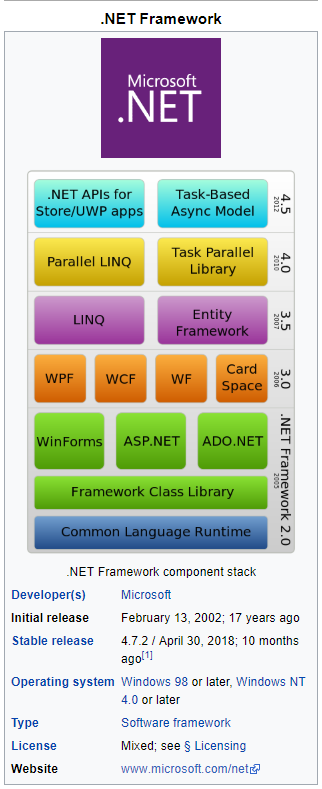
For .NET

JAX-WS Annotations

  •  @WebService. This JAXWS annotation can be used in 2 ways.
  • @SOAPBinding. Demonstration of @SOAPBinding JAXWS annotationhas already been shown in first program
  • @WebMethod. @WebMethod JAXWS annotation can be applied over a method only.
  • @WebResult.
  • @WebServiceClient.

@WEBSERVICE

This JAX-WS annotation can be used in 2 ways. If we are annotating this over a class, which means that we are trying to mark the class as the implementing the Web Service, furthermore Service Implementation Bean (SIB). Or we are marking this over an interface, it means that we are defining a Web Service Interface (SEI), in other words Service Endpoint Interface.W

@SOAPBINDING

This annotation is used to specify the SOAP messaging style which can either be RPC or DOCUMENT. The encoding style of message sent to and fro while using the web service is represented by this style.

With RPC style a web service is capable of only using simple data types like integer or string. Furthermore, DOCUMENT style is capable of richer data types for a class as an example Person, which can have attributes like String nameAddress address etc.

Document style indicates that in the underlying web service, moreover underlying message shall contain full XML documents, whereas in the RPC style, the underlying message contains parameters and return values in request and response message respectively. By default the style is Document.

Use is the other important optional attribute . It represents the formatting style of the web service message. Furthermore its value can either be literal or encoded.

Example

@SOAPBinding(style=Style.DOCUMENT, use=Use.LITERAL)

@WEBMETHOD

@WebMethod JAX-WS annotation can be applied over a method only. Furthermore this specified that the method represents a web service operation.

@WEBRESULT,

Elements to @WebResult are WebParam.Mode which defines the direction in which parameter is flowing, moreover targetNamespace is used to define XML namespace for the parameter.

@WEBSERVICECLIENT

Web Service Testing,

Web Services Testing is testing of Web services and its Protocols like SOAP & REST. To test a Webservice need to follow these.

  1. Test Manually
  2. Create your own Automation Code
  3. Use an off-the shelf automation tool like SoapUI.

WebService Testing involves following steps –

  1. Understand the WSDL file
  2. Determine the operations that particular web service provides
  3. Determine the XML request format which we need to send
  4. Determine the response XML format
  5. Using a tool or writing code to send request and validate the response

If we want to test a WebService which provides Currency Conversion Facility, it will the current conversion rates between the different countries currency. Moreover this service we can use in our applications to convert the values from one currency to the other currency.

REFERENCES

https://www.maxcdn.com/one/visual-glossary/web-application/

https://www.tutorialspoint.com/webservices/what_are_web_services.html

https://www.ibm.com/support/knowledgecenter/SSQ2R2_14.0.0/com.ibm.etools.est.doc/concepts/

https://www.guru99.com/webservice-testing-beginner-guide.html

https://examples.javacodegeeks.com/enterprise-java/jws/jax-ws-annotations-example/

https://www.tutorialspoint.com/wsdl/wsdl_port_type.htm

Distributed Systems

Content

  1. Introduction to Distributed Systems
  2. Architecture of the Distributed Systems
  3. Communication in Distributed Systems

Distributed Systems VS Distributed computing

A distributed system is a network that consists of autonomous computers that are connected using a distribution middle ware. Furthermore They help in sharing different resources and capabilities to provide users with a single and integrated coherent network.

The key features of a distributed system are,

  • Components in the system are concurrent moreover a distributed system allows resource sharing, including software by systems connected to the network at the same time.
  • They will generally be autonomous in nature, but there can be multiple components.
  • A global clock is not required in a distributed system. So that the systems can be spread across different geographies.
  • There is greater fault tolerance in a distributed model than other models.
  • Price/performance ratio is much better.

The key goals of a distributed system:

  • Transparency:Achieving the image of a single system image without concealing the details of the location, access, migration, concurrency, failure, relocation, persistence and resources to the users
  • Openness: Making the network easier to configure and modify
  • Reliability: Compared to a single system, a distributed system should be highly capable of being secure, consistent and have a high capability of masking errors.
  • Performance: Compared to other models, distributed models are expected to give a much-wanted boost to performance.
  • Scalability: Distributed systems should be scalable with respect to geography, administration or size.

Challenges for distributed systems include:

  • Security is a big challenge in a distributed environment, especially when using public networks.
  • Fault tolerance could be tough when the distributed model is built based on unreliable components.
  • Coordination and resource sharing can be difficult if proper protocols or policies are not in place.
  • Process knowledge should be put in place for the administrators and users of the distributed model.

Distributed computing is a model in which components of a software system are shared among multiple computers in order to improve efficiency and performance. Furthermore according to the narrowest of definitions, distributed computing is limited to programs with components shared among computers within a limited geographic area.

field of computer science that studies distributed systems is Distributed computing .A distributed system is a system whose components are located on different networked computers and passing messages to one another to communicate and coordinate their actions.

Standalone Systems

Standalone. A Standalone application is a binary that can be launched directly. That is, it does not run on the Streams runtime environment. You can instruct the compiler to generate a Standalone application by providing the -T option at compile time. In Standalone mode, all operators will be fused into a single partition and a single processing element (PE) will be generated for this partition. A Standalone executable is also generated with the name Standalone in the output/bin directory. When launched, this executable will load the aforementioned PE.

standalone device is any mechanism or system that can perform its function without the need of another device, computer, or connection. Moreover a perfect example of a standalone device is a copy of a fax machine.

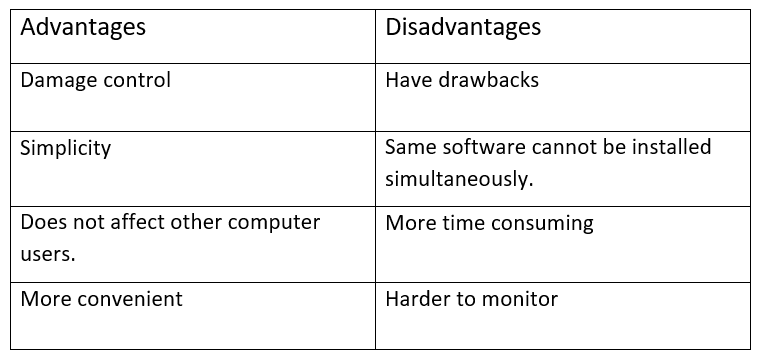
Advantages VS Disadvantages of Standalone systems

This image has an empty alt attribute; its file name is 11-1.png

Standalone Systems vs Distributed Systems.


Examples of distributed systems and applications of distributed computing,

  • telecommunication networks – telephone networks and cellular networks,
  • network applications – World Wide Web and peer-to-peer networks,
  • real-time process control – aircraft control systems,
  • parallel computation

Characteristics of a web based system,

The characteristics of a web application are many and varied in comparison to traditional applications. Furthermore there is a larger spectrum of possibilities for each web application characteristic. An additional motivation to examine a web application’s usability is provided by these differences .Through determining of the set of usability attribute, these characteristics can aide in better defining and measuring web usability.

Micro service architecture ,

Micro services are a software development technique—a variant of the service-oriented architecture (SOA) architectural style that structures an application as a collection of loosely coupled services. In a micro services architectureservicesare fine-grained and the protocols are lightweight.

Monolithic architecture,

Monolithic, in this context, means composed all in one piece. Monolithic software is designed to be self-contained; components of the program are interconnected and interdependent rather than loosely coupled as is the case with modular software programs.

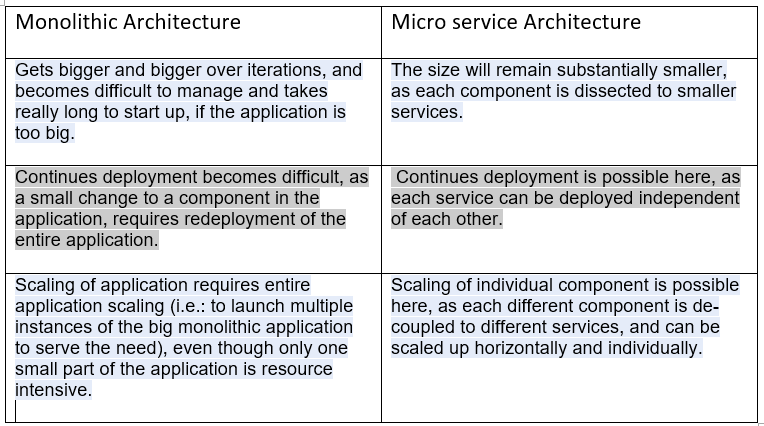
Monolithic architecture vs Micro service Architecture,

The characteristics of a web application are many and varied in comparison to traditional applications. Furthermore there is a larger spectrum of possibilities for each web application characteristic. To examine a web application’s usability, these differences provide additional motivation . Moreover through determining of the set of usability attribute, these characteristics can aide in better defining and measuring web usability.

MVC style,

The MVC design pattern decouples these major components allowing for efficient code reuse and parallel development and traditionally used for desktop graphical user interfaces (GUIs). Moreover this architecture has become popular for designing web applications and even mobile, desktop and other clients.

Faster development process – MVC supports rapid and parallel development. then it is possible that one programmer can work on the view while the another can work on the controller to create business logic of the web application, If an MVC model is used to develop any particular web application .

Furthermore Model View Controller or MVC , is a software design pattern for developing web applications. A Model View Controller pattern is made up of the following three parts − Model − The lowest level of the pattern which is responsible for maintaining data.

In object-oriented programming development, model-view-controller (MVC) is the name of a methodology or design pattern for successfully and efficiently relating the user interface to underlying data models. The MVC pattern is widely used in program development with programming languages such as Java, Smalltalk, C, and C++.

The MVC pattern has been heralded by many developers as a useful pattern for the reuse of object code and a pattern that allows them to significantly reduce the time it takes to develop applications with user interfaces.

Moreover the Model-View-Controller (MVC) is an architectural pattern that separates an application into three main logical components which are the model, the view, and the controller. Each of these components are built to handle specific development aspects of an application.

  • Model , which represents the underlying, logical structure of data in a software application and the high-level class associated with it. This object model does not contain any information about the user interface.
  • View , which is a collection of classes representing the elements in the user interface (all of the things the user can see and respond to on the screen, such as buttons, display boxes, and so forth)
  • Controller , which represents the classes connecting the model and the view, and is used to communicate between classes in the model and view.

Advantages VS Disadvantages of MVC ,

RPC

Remote Procedure Call (RPC) is a protocol that one program can use to request a service from a program located in another computer on a network without having to understand the network’s details. Moreover A procedure call is also sometimes known as a function call or a subroutine call.

RMI

  1. Remote Method Invocation (RMI)
  2. Understanding stub and skeleton
    1. stub
    2. skeleton
  3. Requirements for the distributed applications
  4. Steps to write the RMI program
  5. RMI Example

The RMI (Remote Method Invocation) is an API that provides a mechanism to create distributed application in java which allows an object to invoke methods on an object running in another JVM.

The RMI provides remote communication between the applications using two objects stub and skeleton.

CORBA,

WHAT IS CORBA?

CORBA® is the acronym for Common Object Request Broker Architecture™, OMG®’s open, vendor-independent architecture and infrastructure that computer applications use to work together over networks.


WHAT IS CORBA GOOD FOR?

CORBA is useful in many situations. CORBA works behind the scenes in the computer rooms of many of the world’s largest websites, ones that you probably use every day.

CORBA STANDARDS

OMG’s best support for server-side scalability comes from the CORBA Component Model. Moreover over 400 attendees at each OMG meeting make it a happening as well as an occasion to advance the OMG specification suite.

XML

XML. Extensible Markup Language (XML) is a markup language that defines a set of rules for encoding documents in a format that is both human-readable and machine-readable. The W3C’s XML 1.0 Specification and several other relatedspecifications—all of them free open standards—define XML.Type of format: Markup languageUniform Type Identifier (UTI): public.xmlOpen format?: YesExtended from: SGML

JSON VS XML

Why JSON Is Better Than XML. For awhile, XML (extensible markup language) was the only choice for open data interchange. But over the years there has been a lot of transformation in the world of open data sharing.

The more lightweight JSON (Javascript object notation) has become a popular alternative to XML for various reasons. Some are;

  1. Less verbose- XML uses more words than necessary
  2. JSON is faster- Parsing XML software is slow and cumbersome. Many of these DOM manipulation libraries can lead to your applications using large amounts of memory due to the verbosity and cost of parsing large XML files.

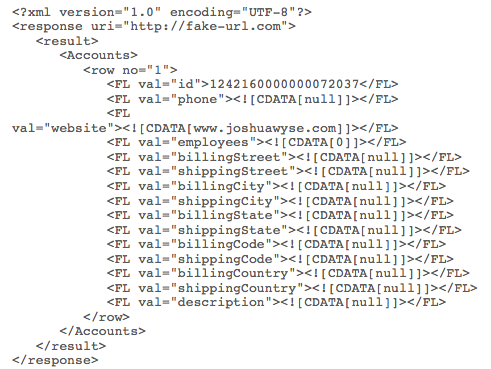
XML:

JSON vs. XML

This XML structure is not intuitive, making it hard to represent in code.

JSON:

JSON vs. XML

JSON’s structure is intuitive, making it easy to read and map directly to domain objects in whatever programming language is being used.

benefits of JSON over XML

  1. JSON data model’s structure matches the data – JSON’s data structure is a map whereas XML is a tree. Although a map (just key/value pairs) can be limiting, that’s what we want, because it is easier to interpret and is predictable.
  2. In code – Items are represented the same way in code. In many languages, especially dynamic ones, you can just ‘slurp in the JSON’ and you immediately have your domain object. It is easy to go from objects in JSON to the objects in code because they align. When going from objects in XML to objects in code they do not align and there is a lot of room for interpretation.
  3. JSON is limiting, but that’s a good thing – JSON is limited in terms of what objects can be modeled. Some may think XML is better because more objects can be modeled and it doesn’t prohibit developers. But even though JSON prohibits developers, it is in a positive way, making the code simpler, more predictable, and easy to read. XML can be formatted to look and function any way a company wants, but it makes it difficult for developers to read, understand, and convert.  In most cases people believe XML is better because developers can do anything under the sun but in the age of simplifying, less is more, making JSON a better alternative.

Building RESTful APIs as Cloud Elements does, requires a reliable, fast, and easy to use form of data exchange. Furthermore all of our APIs use JSON, and for endpoints that don’t support JSON, we transform our easy-to-understand JSON into XML and back, so you don’t have to deal with it. As RESTful API practices and simpler forms of data exchange become more popular, JSON will be leaving XML practices in the dust.

Apache Ant and Maven

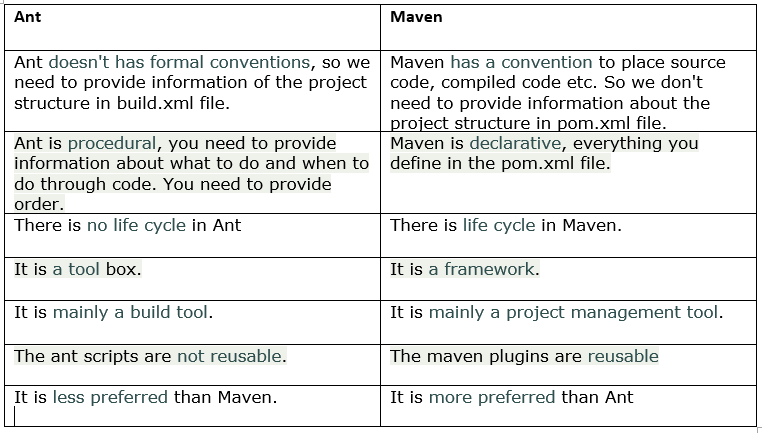
Differences

Group ID,Artifact ID, Version & Packaging

group Id uniquely identifies your project across all projects, so we need to enforce a naming schema. Moreover a group Id must follow Java’s package name rules. This means it must start with a reversed domain name you control. You can create as many subgroups as you want.

artifact Id is the name of the jar without version.

Packaging

The products of Maven are always written to the “target” directory. ” mvn clean will erase these products, so generally build a package using the command “mvn clean package”. Moreover “packaging jar” means quite simply that the goal is to produce a jar file in the target directory. ” packaging war” would build a WAR file. 

Version

SNAPSHOT is a special version that indicates a current development copy. Unlike regular versions, Maven checks for a new SNAPSHOT version in a remote repository for every build.

Industry Practices and Tools 2

Content

  1. Code quality
  2. Dependency/Package management
  3. Build tools
  4. Additional tools

Quality of CODE

Good quality code is an essential property of a software because
if code quality is not good enough, it could lead to financial losses or waste of time when it’s needed for further maintenance, modification or adjustments .

Creating quality code  means that the software is more durable, easy to use, and can be easily maintained by the users. So it is important to create quality code.

Clean code is critical in the software industry as it is perceived as what makes or breaks a project Furthermore Startups and companies have shut down because of the insurmountable technical debt that unclean code has brought them.

Clean code is code that is easy to understand and easy to change.  means the code is easy to read, even that reader is the original author of the code or somebody else. When meaning is clear it minimizes the need for guesswork and possibility for misunderstandings.

Measuring Code Quality with Test Coverage Metrics;Test coverage and code quality are two of a handful of fundamental metrics used to analyse, track and measure the effectiveness of an IT project or initiative. Furthermore one of the ways we measure code quality is by looking at corresponding test coverage.

How to maintain a quality code?

  • Follow a style.
  • Find developers to code review your work.
  • Review other people’s great code.
  • Refactor regularly.
  • Write unit tests that cover your model, then move to your interface.
  • Avoid duplicating code.
  • Avoid commenting for the sake of it.
  • Communicate with your team developers to set expectations.

Tools for maintaining code quality,

  • Checkstyle

Checkstyle is a free and open source static code analysis tool used in software development for checking whether Java code conforms to the coding conventions you have established. It automates the crucial but boring task of checking Java code. It is one of the most popular tools used to automate the code review process.

  • PMD

Is a static code analysis tool that is capable to automatically detect a wide range of potential bugs and unsafe or non-optimized code. Furthermore it examines Java source code, and looks for potential problems such as possible bugs, dead code, suboptimal code, overcomplicated expressions, and duplicated code.

 PMD can be used with Eclipse,Intellij IDE,Maven,Gradle, or Jenkins. 

  • FindBugs

Is an open source Java code quality tool with a quite different focus, which is similar in some ways to Checkstyle and PMD. FindBugs doesn’t concern the formatting or coding standards but it is only marginally interested in best practices.

FindBugs is mainly used for identifying hundreds of serious defects in large applications that are classified in four ranks:

  • scariest
  • scary
  • troubling
  • of concern
  • SonarQube

Is an open source platform which was originally launched in 2007 and used by developers to manage source code quality. Sonar
can be used as a shared central system for quality management, because it was designed to support global continuous improvement strategy on code quality within a company. Furthermore it makes management of code quality possible for any developer in the team. As a result, it has become a world’s leader in Continuous Inspection of code quality management systems in recent years .

Sonar currently supports a wide variety of languages including,

  • Java
  • C/C++
  • C#
  • PHP
  • Flex
  • Groovy
  • JavaScript
  • Python
  • PL/SQL (some of them via additional plugins).

And Sonar is very useful as it offers fully automated analyses tools and integrates well with Maven, Ant, Gradle, and continuous integration tools.

Dependency/Package management tools.

That is,  rather than forcing every package to share the same canonical set of packages,every package installed gets its own set of dependencies This is because, in most package management models, only one version of any particular package can be installed at a time.

Furthermore, User doesn’t have to hunt down information about bug and security fixes, because package management tools keep track of updates and upgrades

Without package management, users must ensure that all of the required dependencies for a piece of software are installed and up-to-date, compile the software from the source code (which takes time and introduces compiler-based variations from system to system), and manage configuration for each piece of software. Without package management, application files are located in the standard locations for the system to which the developers are accustomed, regardless of which system they’re using.

Tools available in the industry,


Build Automation,

Build Automation is the process of scripting and automating the retrieval of software code from a repository, compiling it into a binary artifact, executing automated functional tests, furthermore publishing it into a shared and centralized repository.

Moreover it can be described as creation of a software build and the associated processes with compiling computer source code into binary code, packaging binary code, furthermore running automated tests.

Build Tools


Build tools are programs that automate the creation of executable applications from source code. Building incorporates compiling, linking and packaging the code into a usable or executable form. developers will often manually invoke the build process in small projects, . This is not practical for larger projects, where it is very hard to keep track of what needs to be built, in what sequence and what dependencies there are in the building process. Using an automation tool allows the build process to be more consistent.

Types of build tools,

few things to look for when selecting a build tool.

  1. Speed. Ideally, we want are build tool to be fast in execution as there’s much need for speed when iterating on a website or app. Furthermore when changing a line of code, needs to reload the page to see the changes instantly. Disrupting that process could slow down productivity.
  2. Community driven. The tool you select should have a healthy community of developers that exchange plugins and continually adding functionality to support it. 
  3. Modular and flexible. Even the most advanced tool has its limits. Tools that are extensible allow you to add your own custom functionality giving you the flexibility to adjust as you see fit. 

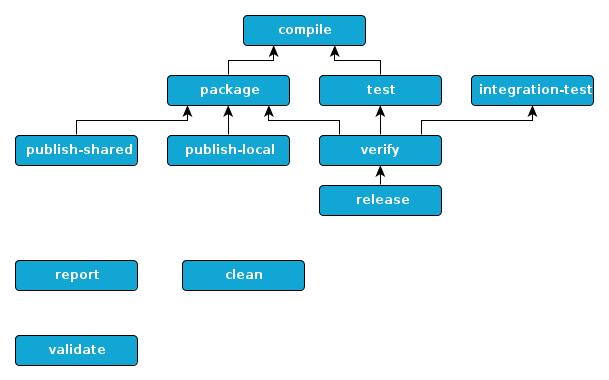
Build life cycle,

Build Life cycle is a well-defined sequence of phases, which define the order in which the goals are to be executed. Here phase represents a stage in life cycle. There are always pre and post phases to register goals, which must run prior to, or after a particular phase.

Maven,

Means accumulator of knowledge, was originally started as an attempt to simplify the build processes in the Jakarta Turbine project. There were several projects each with their own Ant build files that were all slightly different and JARs were checked into CVS. We wanted a standard way to build the projects, a clear definition of what the project consisted of, an easy way to publish project information and a way to share JARs across several projects.

Maven objectives

  • Making the build process easy
  • Providing a uniform build system
  • Providing quality project information
  • Providing guidelines for best practices development
  • Allowing transparent migration to new features

Conventions over configuration,

Maven uses Convention over Configuration, which means developers are not required to create build process themselves. Maven provides sensible default behavior for projects.
Moreover Maven creates default project structure, when a Maven project is created.

Build Phase

A build Phase is Maid up of plugins goals.A

However, even though a build phase is responsible for a specific step in the build lifecycle, the manner in which it carries out those responsibilities may vary. And this is done by declaring the plugin goals bound to those build phases.

Build profile.

Build profile is a set of configuration values, which can be used to set or override default values of Maven build. Using a build profile, you can customize build for different environments such as Production v/s Development environments.

Maven,

Maven is based around the central concept of a build life cycle. There are three built-in build life cycles;

  • default,
  • clean and
  • site.

The default life cycle ,handles your project deployment.the clean life cycle handles project cleaning, while the site life cycle handles the creation of your project’s site documentation.

he Maven build follows a specific life cycle to deploy and distribute the target project. There are three built-in life cycles: default: the main life cycle as it’s responsible for project deployment. h

Industry Practices and Tools

Content

  • Version Controlling
  • GIT
  • CDN
  • Virtualization

Version Controlling

Version Control,  Revision Control or Source Code Management, is the management of changes to documents, computer programs, websites or other collection of information.

Benefits

  • Version tracking and branching
  • Tagging
  • Restoring Previous Version
  • Collaboration
  • Audit
  • Easy Integration with IDE and other tools

How to choose a perfect VCS? Look for these…

  • Project requirement
  • Ease of use
  • Documentation
  • Portability
  • Multi sites vs Single sites
  • cost
  • Community and support

Available tools

  • CVS (Concurrent Version system) 

Tortoise CVS, Xcode(Mac) , NetBeans, eclips,Emacs are grate client for CVS.

SourceForge, Apache,Python,Ruby and many other large projects use it as a repository.

Some clients are SmartSVN, TortoiseSVN 

  • GIT
  • Microsoft Team Foundation

Even TFS is tailored for Microsoft Visual Studio and Eclipse (on Windows and non-Windows platforms) it can be used as a back end to numerous integrated development environments

  • Perforce
  • Mercurial

Models of VCS

There are three models of VCS. They are,

  • Local version control systems
  • Centralized version controlling systems
  • Distributed version controlling systems

Let’s further see them,

Local Version Control Systems

Track of files within the local system is maintained by Local Version Control System. This approach is very common and simple, furthermore type is also error prone so that the chances of accidentally writing to the wrong file is higher.

Centralized Version Control System

All the changes in the files are tracked under the centralized server. All the information of versioned files, and list of clients that check out files from that central place, includes in the centralized server.
Example: Tortoise SVN

Distributed Version Control System.

Distributed version control systems come into picture to overcome the drawback of centralized version control system. Including its full history, clients completely clone the repository .If any server dies, any of the client repositories can be copied on to the server which help restore the server.

Every clone is considered as a full backup of all the data.
Example: Git

GIT & GitHub

Most common mistake! Git & GitHub are same or different?

Git is a free and open source distributed version control system designed to handle everything from small to very large projects with speed and efficiency.

Git is easy to learn and has a tiny footprint with lightning fast. It outclasses SCM tools like Subversion, CVS, Perforce, and ClearCase with features like cheap local branching, convenient staging areas, and multiple workflows.

GitHub is a Git repository hosting service, which contains many of its own features. Even though Git is a command line tool, GitHub provides a Web-based graphical interface. Furthermore it provides access control and several collaboration features, such as a wikis and basic task management tools for every project.

Git commands,COMMIT and PUSH

Since git is a distributed version control system, the difference is that commit will commit changes to your local repository, whereas push will push changes up to a remote repo. git commit record your changes to the local repository. git push update the remote repository with your local changes.

How to do GIT “commit” and “push”?

  • install and configure Git locally
  • create your own local clone of a repository
  • create a new Git branch
  • edit a file and stage your changes
  • commit your changes
  • push your changes to GitHub
  • make a pull request
  • merge upstream changes into your fork
  • merge changes on GitHub into your local clone

Staging area & Git directory

The Git index is used as a staging area between your working directory and your repository. Index can be used to build up a set of changes that needed to commit together. When creating a commit, what is committed is what is currently in the index, not what is in the working directory.

A step before the commit process in git is Staging. A commit in git is performed in two steps; staging and actual commit. As long as a change set is in the staging area, git allows to edit it as like (replace staged files with other versions of staged files, remove changes from staging, etc.).

git directory is a bare repository (without its own working tree), By pushing into it and fetching from it, that is typically used for exchanging histories with others.

CDN

Content Delivery Network (CDN) is an interconnected system of computers on the internet that provides web content rapidly to large number of users by duplicating or caching the content on multiple servers and directing the content to users on proximity. 

Benifits of CDNs

  • Server Load will decrease

The companies can have an increase in capacity and number of concurrent users that they can handle, as a result of, strategically placed servers which form the backbone of the network . Essentially, the content is spread out across several servers, as opposed to offloading them onto one large server.

  • Content delivery will become fast

Operators can deliver high-quality content with a high level of service due to higher reliability, low network server loads, and thus, lower costs. Moreover, jQuery is ubiquitous on the web. There’s a high probability that someone visiting a particular page has already done that in the past using the Google CDN. Therefore, the file has already been cached by the browser and the user won’t need to download again.

  • Segmenting audio becomes easy

Depending on the kind of device requesting the content, CDNs can deliver different content to different users . They are capable of detecting the type of mobile devices and it can deliver a device-specific version of the content.

  • Lower network latency and packet loss

CDN users can, deliver high definition content with high Quality of Service, low costs, and low network load, because end users experience less jitter and improved stream quality.

  • Higher availability and better usage analytics

CDNs dynamically distribute assets to the strategically placed core, fallback, and edge servers. CDNs can give more control of asset delivery and network load. They can optimize capacity per customer, provide views of real-time load and statistics, reveal which assets are popular, show active regions and report exact viewing details to customers. even with large power, network or hardware outages, CDNs can thus offer 100% availability,

  • Storage & security

CDNs offer secure storage capacity for content such as videos for enterprises that need it, as well as archiving and enhanced data backup services. CDNs can secure content through Digital Rights Management and limit access through user authentication.

CDNs and web hosting server

CDN is short for content delivery network. A content delivery network (CDN) is a system of distributed servers that deliver pages and other Web content based on the geographic locations of the user.

How it’s working?

Servers nearest to the website visitor respond to the request. By caching the contents of the page The content delivery network copies the pages of a website to a network of servers that are dispersed at geographically different locations. When a user requests a webpage that is part of a content delivery network, the CDN will redirect the request from the originating site’s server to a server in the CDN that is closest to the user and deliver the cached content. CDNs will also communicate with the originating server to deliver any content that has not been previously cached.

The process of bouncing through CDNs is nearly transparent to the user. If the delivered URL is different than the URL, that has been requested only, the user able to know if a CDN has been accessed.

What is web hosting?

Web hosting is a service that allows organizations and individuals to post a website or web page onto the Internet.
web hosting service provider, is a business that provides the technologies and services needed for the website or webpage to be viewed in the Internet.

Free and commercial CDNs,

1. CloudFlare

CloudFlare is popularly known as the best free CDN for WordPress users. Moreover it is one of the few industry-leading players that actually offer a free plan. Powered by its 115 datacenters, CloudFlare delivers speed, reliability, and protection from basic DDoS attacks. Furthermore it’s WordPress plugin is used in over 100,000 active websites.


Photon by Jetpack

To all WordPress users – Jetpack needs no introduction. In their recent improvement of awesomeness, they’ve included a free CDN service (called Photon) that serves your site’s images through their globally powered WordPress.com grid. Furthermore to get this service activated, all you have to do is download and install Jetpack and activate its Photon module.


­­­­­­­­­

Incapsula provides Application Delivery from the cloud: Global CDN, Website Security, DDoS Protection, Load Balancing & Failover. It takes 5 minutes to activate the service, moreover they have a great free plan and a WordPress plugin to get correct IP Address information for comments posted to your site.

5. AWS Cloudfront

Amazon Web Services (AWS) is a pioneer in bringing high performance cloud computing to the masses at an affordable rate. One of their services is Amazon CloudFront an industry-leading content delivery network used by the likes of Slack and Spotify!

To top that off, they have a free usage tier of one full year. And the quota? 50GB of outbound transfer over the trial period. This is definitely a must-try for all WordPress enthusiasts.

How do you get started?

Google Cloud CDN

Similar to AWS, Google Cloud offers $300 USD credits over a one-year duration, with access to their Cloud CDN platform. We’ve covered how to install WordPress on Google Cloud in the past. Moreover Today, there are one-click solutions to deploy WordPress (and other leading CMS) across multiple cloud providers.

7. Microsoft Azure CDN

Microsoft Azure currently (i.e. July 2017) offers a 30-day trial of its services with $200 USD worth of credits. Furthermore The Azure CDN is available in multiple datacenters across the globe.

8. Cloudinary

If you run website that heavily dependent on images (think portfolios of photography/design services), offloading your images to another server would be a good idea. You would end up saving a lot of precious bandwidth. Moreover Cloudinary is a robust image management solution that can host your images, resize them on-the-fly and a ton of other cool features. Moreover in their forever-free plan, they offer 2GB storage with 5GB of bandwidth.

9. Imgur

A wildly-popular image hosting site, which is fast, reliable and perfect for beginners. If you’re just starting up and looking for an easy way to save server bandwidth, imgur along with other popular image hosting sites like PhotoBucket and Flickr should serve your purposes to the fullest

Virtualization

Requirements for virtualization,

  • Processor that supports Intel VT-X
  • Minimum 2 GB Memory (NAS reserves 1.5 GB Memory): TS-x51 series (Please note: If TS-x51 series want to run Virtualization Station, please install a significant amount of memory. )
  • Minimum 4 GB Memory (NAS reserves 2 GB Memory): TS-x70, TS-x70 Pro, TS-ECx80 Pro, TS-x70U-RP, TS-x79U-RP, TS-ECx79U-RP, TS-ECx79U-SAS-RP, SS-ECx79U-SAS-RP and TS-ECx80U-RP series
    (Please note: If you want to run the Virtualization Station on the TS-x70 and TS-x70 Pro series, please contact us)
  • Minimum 550 MB Hard disk space
  • Minimum two Ethernet cables (Note: The network usage of Virtualization Station is separated from the Turbo NAS. One is for the Turbo NAS to use and the other is for virtual machines to use)
  • Supported NAS series:TS-x51/TS-x51-4G, TS-x70, TS-x70 Pro, TS-x70U-RP, TS-x79U-RP, TS-ECx79U-RP, TS-ECx79U-SAS-RP, SS-ECx79U-SAS-RP, TS-ECx80 Pro and TS-ECx80U-RP, series (Please note: If you want to run the Virtualization Station on the TS-x70 and TS-x70 Pro series, 

Different Types of Virtualization,

  • Hardware/Server Virtualization.
  • Network Virtualization.
  • Storage Virtualization.
  • Memory Virtualization.
  • Software Virtualization.
  • Data Virtualization.
  • Desktop virtualization.

Hypervisor,

hypervisor or virtual machine monitor (VMM) is computer software, firmware or hardware that creates and runs virtual machines. A computer on which ahypervisor runs one or more virtual machines is called a host machine, and each virtual machine is called a guest machine.

Emulation vs VMs,

Virtual machines make use of CPU self-virtualization, to whatever extent it exists, to provide a virtualized interface to the real hardware. Emulators emulate hardware without relying on the CPU being able to run code directly and redirect some operations to a hypervisor controlling the virtual container.

VMs and containers/dockers,

Containers also provide a way to isolate applications and provide a virtual platform for applications to run on (see figure, b). Two main differences exist between acontainer and a hypervisor system. … A hypervisor, on the other hand, runs VMsthat have their own operating system using hardware VM support

Difference between Global and local configuration?

Global variables are declared outside any function,and they can be accessed(used) on any function in the program.

Local variables are declared inside a function , and can be use only inside that function.

  • Git repository,
  • can set a git username only for a single repository on the computer.
  • $ git config user.name “Sliit”
  • then need to confirmit as,
  • $ get config user.name
  • >Sliit

Git Username and GitHub username

The Git username is not as github username. The new name you set will be visible in any future commits you push to GitHub from the cmd line.

Most references for your repositories under the old username automatically change to the new username.

commits made with your username@users.noreply.github.com email address will no longer be associated with your account.

If you’d like to keep your real name private, you can use any text as your Git username.

Setting your Git username for every repository on your computer

  1. Open Git Bash.
  2. Set a Git username:

$ git config –global user.name “Sliit”

  1. Confirm that you have set the Git username correctly:
  2. $ git config –global user.name

>Sliit

Setting your Git username for a single repository

  1. Open Git Bash.
  2. Change the current working directory to the local repository where you want to configure the name that is associated with your Git commits.
  3. Set a Git username:

$ git config user.name “Sliit”

  1. Confirm that you have set the Git username correctly:
  2. $ git config user.name

>Sliit

Programming Applications and Frameworks.

content

  • Programming Paradigms
  • Software run-time architecture
  • Development tools
  • Frameworks vs libraries vs plugins

Paradigms are a way to classify programming languages based on their features. Languages can be classified into multiple paradigms. furthermore Some computer languages support multiple paradigms.

Imperative and Declarative paradigms,

With imperative programming,you tell the compiler what you want to happen, step by step. Furthermore we’d step through this and decide what we want. But with declarative programming on the other hand, you write code that describes what you want, but not necessarily how to get it, which means declare your desired results, but not the step by step. More over declarative programming is when you say what you want, and imperative language is when you say how to get what you want.

Procedural programming and Functional programming,

Procedural

  • The out put of the routine does not always have a direct correlation with the input.
  • Everything is done according to a specific order.
  • Side effects may have, in a execution of a routine.
  • Implementing solutions, tends to emphasize in a linear fashion.

Functional

  • Often recursive
  • Always returns the same out put for a given input.
  • Usually order of evaluation is undefined.
  • Must be stateless and no operation can have side effects
  • It is a good fit for the parallel execution.
  • Tends to emphasize a divide and concur approach.
  • May have the feature of lazy evaluation.

Lambda calculus and Lambda expression,

lambda calculus is a framework developed in 1930 s
by Alonzo church to study computations with functions.

let’s see the syntax of lambda calculus, It includes three different types of expressions;

  • E:: = x (variables)
  • |E1E2 (function application)
  • (function creation)

Pure lambda calculus has no built in functions.

Lambda expression is an anonymous function that you can use to creates delegates or expression tree types. By using lambda expression you can write local functions that can be passed as arguments or returned as the value of the function calls. More over lambda expressions offer a syntactical advantage of over a traditional anonymous function declaration.

function (x) {return x* x};

Referential transparency,

Referential transparency is used when describing notations where only the meaning of immediate component expressions is significant in determining the meaning of a compound expression.

Advantage of referential transparency in programming language is that mathematical reasoning is available for referential transparent programs.

Key features of Object Oriented Programming,

According to “pcmag.com”, there are three major features in object-oriented programming; They are: encapsulation,inheritance and polymorphism.

Furthermore another set of features of OOP are;

  • object
  • class
  • Data hiding and encapsulation
  • Dynamic Binding
  • Message passing
  • Inheritance
  • Polymorphism

Objects,

Objects are the basic run-time entities in an object-oriented programming. They may represents any item that the program has to handle. Furthermore they represents user-defined data such as vector, time and lists. The object interact by sending message to one another, When the program is executed.

Classes:

Objects contain data, and code to manipulate that data. The entire set of data and code of an object can be made a user-defined data type with the help of class. We can create a number of objects belonging to that class,
once a class has been defined. More over a class is a collection of objects of similar type.

Ex. Flower rose;

Data Abstraction,

Abstractions means the act of representing essential features without including background details or explanation. More over it commonly known as Abstraction Data Type(ADT).

Encapsulation,

The wrapping up of data and functions into single unit is known as encapsulation. This is a striking feature of a class. The data is not accessible to the outside world, and it can only access by those functions which are wrapped in the class. The interface between the object’s data and the program is provided by these functions.

Inheritance:

Inheritance is the process by which objects of one class acquire the properties of object of another class. The class whose members are inherited is called the Base class and the class that inherits those members is called Derived class. It supports class of hierarchical classification.

The ideas of re-usability is provided by the concept of inheritance . This means we can add essential features to an exciting class without modifying it.

Polymorphism:

The term Polymorphism means the ability to take more than one form. At different instances, an operation may exhibit different behaviors.

Event-driven programming and other programming paradigms,

An event-driven program is one that largely responds to user events or other similar input. The concept of event driven programming is an important one in application development and other kinds of programming. Furthermore it has spawned the emergence of event handlers and other resources. More over this is known as an event-driven application.

Programming paradigm is a style or way of programming. A paradigm is a way of doing something,not a concrete thing.

Compiled languages,Scripting languages, and Markup languages.

Programming languages are those that their end results are compiled, they are known as compiled languages. Mostly use IDE s for those. Examples are: JAVA,visual basic,c,c++,c#,etc.

Markup languages are languages that are not executed or use to perform actions, but they are used to structure data. Examples: HTML,XML

Scripting languages are languages that are not compiled, and interpreted at run-time. Like a file containing instructions for a computer to follow to carry out a task. Examples: java script, php, python,etc.

Virtual run-time machines,

A process virtual machine, some times called an application virtual machine or Managed run-time environment(MRE), runs as normal application inside a host OS and supports a single process. Furthermore virtualization limits costs by reducing the need for physical hardware systems. Virtual machines more efficiently use hardware,which lowers the quantities of hardware and associated maintenance costs,and reduces power and cooling demand.

Java Script code

Node.js is a JavaScript run-time environment .Both browser, java script and Node.js run on the V8 JavaScript run-time engine. this engine takes your java script code and converts it into a faster machine code.

In order to obtain speed ,V8 translates java script code into more efficient machine code instead of using an interpreter. It compiles java script code into more efficient machine code at execution by implementing a JIT.

CASE tools, workbenches, and environments,

CASE tools fall into three categories: Upper CASE tools ,Lower CASE tools,and Integrated CASE tools.

  • Upper CASE tools: Ex:code designers,program editors- support coding ,testing and debugging
  • Lower CASE tools- support coding phase
  • Integrated CASE tools- support analysis,design and coding

Workbenches– types of workbenches,

  • Cross-development workbenches – for host target development.
  • Configure management workbenches
  • Documentation workbenches- for producing professional system documentation.
  • Product management workbenches

Environments

In computer program and software product development, the development environment is the set of processes and programming tools used to create the program or software product.

API

API – Application programming interface – is a set of subroutine definitions,communication protocols, and tools for building software.

Framework,Library, and Plugin,

Framework

Is an abstraction in which software providing generic functionality can be selectively changed by additional user written code,is provides a standard way to build and deploy applications.

Library

Collection of non volatile resources used by computer programs, often for software development. These may include configuration data , documentation, help data, message templates, pre – written code and subroutines, classes values or type specification.

Plugin,

Is a software component that adds a specific feature to an existing computer program when a program supports plugins, it enables customization.

Installing and configuring java,

How to check if JAVA is already installed?

  • Open the command prompt follow the menu path start>programs>Accessories > command prompt.
  • type Java version and press Enter on your keyboard.

JAVA SE, JAVA EE, and J2EE,

Java SE is used to develop applets, which are programs that run in web browsers. Java Enterprise Edition (Java EE) is the Java platform for developing enterprise-oriented applications and servlets, which are server programs that conform to Java EE’s Servlet API. Java EE is built on top of Java SE.

When java enterprise Edition was Introduced, the java platform version is 2,so they named it as J2EE-that is java 2 Enterprise Edition which is used for making web based applications ,which is called as Java EE now a days.

Environmental variables to use Java ,

Java does not need any environment variables to be set. However, setting some environment variables makes some things easier.

If the jre/bin folder is on the path, you don’t have to qualify to run the java command. If the jdk/bin folder is on the path, no need to qualify to run the java and javac commands.

Do we need both JDK and JRE ?

 JDK usually consists of both development & run-time environments in it. If you install JDK then JRE will be in it and installed automatically along with JDK. generally to do javac <filename.java needed to have JDK which already have JRE in it. to do java filename  only JRE is needed.

Do we need to configure the OS for JAVA ,when using an IDE?

The Java Development Kit, or JDK, is a set of development tools used in the programming of Java applications. The Eclipse IDE requires that a JDK be locally installed. Then, under the Eclipse Packages tab, find the listing for Eclipse IDE forJava Developers. Select your OS and download the appropriate archive file.