Content
- Introduction to client-side Elements
- View development
- component development
Client side elements
the main elements of client-side application components of distributed systems are;
- Views- what users see (mostly GUIs)
- controllers- contain event handers for the
- client-model – Business logic and data
The basic elements of an HTML page are,
- A text header, denoted using the
<h1>,<h2>,<h3>,<h4>,<h5>,<h6>tags. - A paragraph, denoted using the
<p>tag. - A horizontal ruler, denoted using the
<hr>tag. - A link, denoted using the
<a>(anchor) tag. - A list, denoted using the
<ul>(unordered list),<ol>(ordered list) and<li>(list element) tags. - An image, denoted using the
<img>tag - A divider, denoted using the
<div>tag - A text span, denoted using the
<span>tag
css
The Importance of CSS in Web Development,
Cascading Style Sheets which is commonly known as CSS, is an integral part of the modern web development process. Furthermore it is a highly effective HTML tool that provides easy control over layout and presentation of website pages by separating content from design
CSS selectors
- Universal selector
- Element Type Selector
- ID selector
- Class Selector
- Descendant Combinator
- Child Combinator
- General Sibling Combinator.
New Features in CSS 3
- CSS 3 Selectors. In addition to the selectors that were available in CSS2, CSS 3 introduces some new selectors.
- CSS 3 Rounded Corners. Rounded corner elements can spruce up a website, but creating a rounded corner requires a designer to write a lot of code.
- CSS 3 Border Image.
- CSS 3 Box Shadow.
- CSS 3 Text Shadow.
CSS Selectors,
- Element selector
The element selector selects the HTML element by name.
Example;
- <!DOCTYPE html>
- <html>
- <head>
- <style>
- p{
- text-align: center;
- color: blue;
- }
- </style>
- </head>
- <body>
- <p>This style will be applied on every paragraph.</p>
- <p id=”para1″>Me too!</p>
- <p>And me!</p>
- </body>
- </html>
- ID selector
The id attribute of an HTML element is selected by the id selector to select a specific element. Moreover an id is always unique within the page so it is chosen to select a single, unique element.
It is written with the hash character (#), followed by the id of the element.
example;
- <!DOCTYPE html>
- <html>
- <head>
- <style>
- #para1 {
- text-align: center;
- color: blue;
- }
- </style>
- </head>
- <body>
- <p id=”para1″>Hello Javatpoint.com</p>
- <p>This paragraph will not be affected.</p>
- </body>
- </html>
- class selector
The class selector selects HTML elements with a specific class attribute. It is used with a period character . (full stop symbol) followed by the class name.
example ;
- <!DOCTYPE html>
- <html>
- <head>
- <style>
- .center {
- text-align: center;
- color: blue;
- }
- </style>
- </head>
- <body>
- <h1 class=”center”>This heading is blue and center-aligned.</h1>
- <p class=”center”>This paragraph is blue and center-aligned.</p>
- </body>
- </html>
Media Features,
| Value | Description |
|---|---|
| any-hover | Does any available input mechanism allow the user to hover over elements? (added in Media Queries Level 4) |
| any-pointer | Is any available input mechanism a pointing device, and if so, how accurate is it? (added in Media Queries Level 4) |
| aspect-ratio | The ratio between the width and the height of the viewport |
| color | The number of bits per color component for the output device |
| color-gamut | The approximate range of colors that are supported by the user agent and output device (added in Media Queries Level 4) |
| color-index | The number of colors the device can display |
| grid | Whether the device is a grid or bitmap |
| height | The viewport height |
| hover | Does the primary input mechanism allow the user to hover over elements? (added in Media Queries Level 4) |
| inverted-colors | Is the browser or underlying OS inverting colors? (added in Media Queries Level 4) |
| light-level | Current ambient light level (added in Media Queries Level 4) |
| max-aspect-ratio | The maximum ratio between the width and the height of the display area |
| max-color | The maximum number of bits per color component for the output device |
| max-color-index | The maximum number of colors the device can display |
| max-height | The maximum height of the display area, such as a browser window |
| max-monochrome | The maximum number of bits per “color” on a monochrome (greyscale) device |
| max-resolution | The maximum resolution of the device, using dpi or dpcm |
| max-width | The maximum width of the display area, such as a browser window |
| min-aspect-ratio | The minimum ratio between the width and the height of the display area |
| min-color | The minimum number of bits per color component for the output device |
| min-color-index | The minimum number of colors the device can display |
| min-height | The minimum height of the display area, such as a browser window |
| min-monochrome | The minimum number of bits per “color” on a monochrome (greyscale) device |
| min-resolution | The minimum resolution of the device, using dpi or dpcm |
| min-width | The minimum width of the display area, such as a browser window |
| monochrome | The number of bits per “color” on a monochrome (greyscale) device |
| orientation | The orientation of the viewport (landscape or portrait mode) |
| overflow-block | How does the output device handle content that overflows the viewport along the block axis (added in Media Queries Level 4) |
| overflow-inline | Can content that overflows the viewport along the inline axis be scrolled (added in Media Queries Level 4) |
| pointer | Is the primary input mechanism a pointing device, and if so, how accurate is it? (added in Media Queries Level 4) |
| resolution | The resolution of the output device, using dpi or dpcm |
| scan | The scanning process of the output device |
| scripting | Is scripting (e.g. JavaScript) available? (added in Media Queries Level 4) |
| update | How quickly can the output device modify the appearance of the content (added in Media Queries Level 4) |
| width | The viewport width |
CSS – inline,internal, external;
CSS can be added to HTML elements in 3 ways;
- Inline – by using the style attribute in HTML elements.
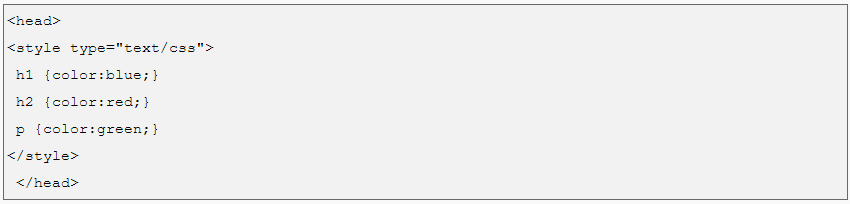
- Internal – by using a <style> element in the <head> section.
- External – by using an external CSS file.

inline CSS,

Internal CSS
External CSS,

C
CSS Libraries/Design stuff;
Animate.css — Animation library
Flat UI Colors — List of simple and effective main colors
Material design lite— Framework based on Google’s material design
Materialui.co — Many resources for Material design framework
Colorrrs — Random color generator
Section separators — Css section dividers
Topcoat — Framework
Create ken burns effect — Ken burns effect using css3 animations
DynCSS — Add functions to css, to make it dynamic
Magic animations — Name speaks for itself
CSSpin — Collection of css spinners
Feather icons — Icons
Ion icons — Icons
Font awesome — Icons
Font generator — Combine multiple fonts and create a mixture
On/Off switch — Create on/off switch in css, good for check or radio buttons
UI Kit — Framework
Bootstrap — Framework
Little Widgets— Html template collection
Frameworks to develop web pages;

- Ruby on Rails.
- Symfony.
- Angular JS.
- React.js.
- Asp.net.
- Node.js.
- Yii Framework.
- Meteor.
Plugins for develop web pages
Best Free WordPress Plugins for Your Website in 2019 (UPDATED)
- WPForms Lite. WPForms Lite is the most beginner friendly contact form plugin on the market today.
- MonsterInsights Lite. MonsterInsights Lite gives you a simple way to connect your WordPress website to your Google Analytics account.
- Google XML Sitemaps.
- Jetpack.
- Lazy Load by WP Rocket.
- W3 Total Cache.
- Yoast SEO.
- UpdraftPlus.
Tools for develpo web pages

The 7 Essential Tools For Frontend Web Development
- Sublime Text.
- Chrome Developer Tools.
- jQuery.
- GitHub.
- Twitter Bootstrap.
- Angular.js.
- Sass.
New Features of JAVA SE 6.
- Changes in I/O.
- Collections Framework Enhancement.
- Changes in jar and zip.
- Java Web Start enhancements in version 6.
- JMX API Enhancements.
- Java Platform Debugger Architecture Enhancements.
- Java SE 6 Monitoring and Management Enhancements.
- New Package java.util.spi in JDK 6.
•Browser-based clients’ components
comprises two main aspects
•Controllers
•Client-model
Using JS/JS-based frameworks, libraries, and plugins,
the components of browser-based clients are developed.
Frameworks/tools to develop the client-side components of browser-based applications.
FRAMEWORKS
Angular JS
A client-side framework, AngularJS incorporates user interface data binding. The data binding is bidirectional: whenever the model changes, the view is automatically updated. In turn, the model updates if the view is changed. The HTML is compiled in the browser and is rendered in the live view on the fly.
Ember JS
EmberJS is an application framework that works with the model-view-controller arrangement. Moreover you can build highly scalable, single-page apps by utilizing Ember’s two-way data binding, templates that update automatically, rich object model, computed properties and router for handling application state.
React JS
With ReactJS, data views are rendered automatically as HTML. This gives developers a system where data flows down, and subcomponents cannot alter enclosing modules. React is useful for creating single-page applications because it creates distinct separations between components on the page – the HTML is updated cleanly and efficiently when the data is changed.
Some common Client Side Scripting technologies:
- HTML (HyperText Markup Language)
- CSS (Cascading Style Sheets)
- JavaScript.
- Ajax (Asynchronous JavaScript and XML)
- jQuery (JavaScript Framework Library – commonly used in Ajax development)
- MooTools (JavaScript Framework Library – commonly used in Ajax development)
REFERENCES
https://www.sitepoint.com/top-javascript-frameworks-libraries-tools-use/
https://www.sitepoint.com/top-javascript-frameworks-libraries-tools-use/

 Dev's blog