Content
- Introduction to the web services
- WSDL
- SOAP
- Implement SOAP Services
Web Application VS Web Services
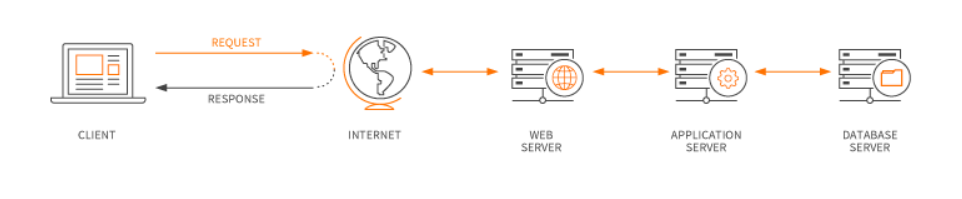
Web application
Is a computer program that utilizes web browsers and web technology to perform tasks over the internet.
Web services
The term Web services describes a standardized way of integrating Web-based applications using the XML, SOAP, WSDL and UDDIopenstandards over an Internet protocolbackbone. XML is used to tag the data, SOAP is used to transfer the data, WSDL is used for describing the services available and UDDI is used for listing what services are available. Used primarily as a means for businesses to communicate with each other and with clients, Web services allow organizations to communicate data without intimate knowledge of each other’s IT systems behind the firewall.
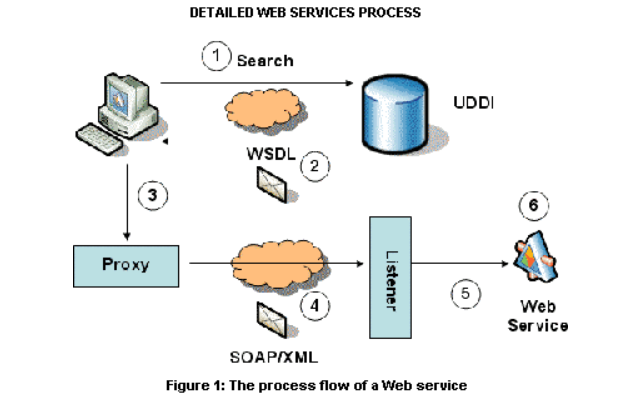
It works like this:
- The account registration information into a SOAP message is bundled by the client program .
- As the body of an HTTP POST request, this SOAP message is sent to the Web Service .
- The Web Service unpacks the SOAP request and converts it into a command that the application can understand.
- The information is processed by the application as required and responds with a new unique account number for that customer.
- Next, the Web Service packages up the response into another SOAP message, which
in response to its HTTP request, it sends back to the client program. - To obtain the results of the account registration process, the client program unpacks the SOAP message .
WSDL,
As a set of endpoints operating on messages containing either document-oriented or procedure-oriented information, WSDL is an XML format for describing network services . The operations and messages are described abstractly, furthermore bound to a concrete network protocol and message format to define an endpoint. Abstract endpoints (services)
are combined into related concrete endpoints. regardless of what message formats or network protocols are used to communicate, WSDL is extensible to allow description of endpoints and their messages .
Furthermore WSDL describes the public interface to the Web service.To provide Web services over the Internet, WSDL is often used in combination with SOAP and an XML Schema.
To determine what operations are available on the server, a client program connecting to a Web service can read the WSDL file.
SOAP and WSDL are related and complementary standards for web services, furthermore they are typically used together. WSDL is a service description language, moreover it describes the interface of the service,the structure of the XML messages that the service can accept.
Structure of a WSDL doccument ,
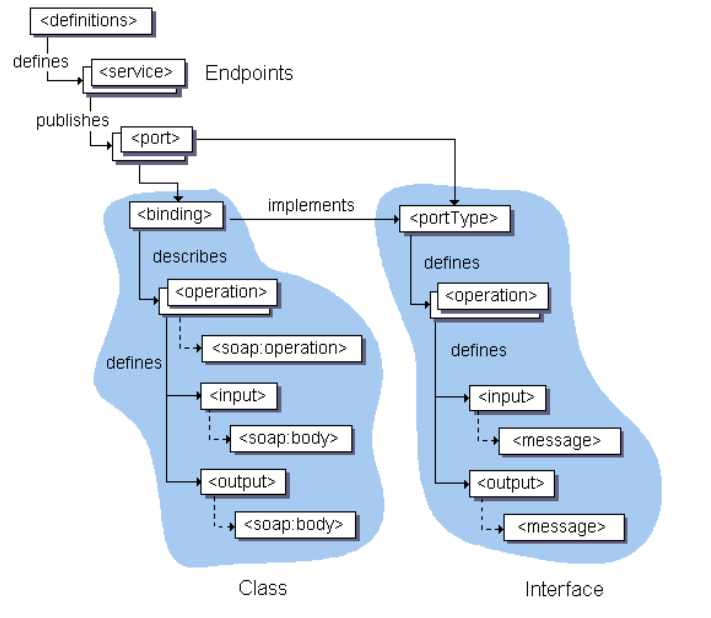
Eliments of a WSDL document
A WSDL document has a definitions element which contains the other five elements, types, message, port Type, binding and service. The features of the generated client code are described by the following sections
WSDL supports the XML Schemas specification (XSD) as its type system. Furthermore definitions contains the definition of one or more services. JDeveloper generates the following attribute declarations for this section:
nameis optional.targetNamespaceis the logical namespace for information about this service. WSDL documents can import other WSDL documents, and setting targetNamespace to a unique value ensures that the namespaces do not clash.xmlnsis the default namespace of the WSDL document, and it is set tohttp://schemas.xmlsoap.org/wsdl/.- All the WSDL elements, such as
<definitions>,<types>and<message>reside in this namespace. xmlns:xsdandxmlns:soapare standard namespace definitions that are used for specifying SOAP-specific information as well as data types.xmlns:tnsstands for this namespace.xmlns:ns1is set to the value of theschema targetNamespace, in the<types>section.
Notice that the default of http://tempuri.org in namespaces to ensure that the namespaces are unique.
- types
Information about any complex data types used in the WSDL document is provided by types. The document does not need to have a types section, when simple types are used .
- message
An abstract definition of the data being communicated. Furthermore in the example, the message contains just one part, response, which is of type string, where string is defined by the XML Schema.
- operation
An abstract description of the action supported by the service.
- portType
An abstract set of operations supported by one or more endpoints.
- binding
Describes how the operation is invoked by specifying concrete protocol and data format specifications for the operations and messages.
- port
Specifies a single endpoint as an address for the binding, thus defining a single communication endpoint.
- service
Specifies the port address of the binding. The service is a collection of network endpoints or ports.
Further details on Port Types-
The <portType> element combines multiple message elements to form a complete one-way or round-trip operation.
As an example, a <portType> can combine one request and one response message into a single request/response operation. Furthermore this is most commonly used in SOAP services. Moreover portType can define multiple operations.
Ex;
<portType name = "Hello_PortType">
   <operation name = "sayHello">
      <input message = "tns:SayHelloRequest"/>
      <output message = "tns:SayHelloResponse"/>
   </operation>
</portType>
- The portType element defines a single operation, called sayHello.
- The operation consists of a single input message SayHelloRequest and an
- output message SayHelloResponse.
Port types-Method Summary
void
| addOperation(Operation operation) Add an operation to this port type. |
org.w3c.dom.Element
| getDocumentationElement() Get the documentation element. |
Operation
| getOperation(java.lang.String name, java.lang.String inputName, java.lang.String outputName) Get the specified operation. |
java.util.List
| getOperations() Get all the operations defined here. |
QName | getQName() Get the name of this port type. |
boolean
| isUndefined() |
void
| setDocumentationElement(org.w3c.dom.Element docEl) Set the documentation element for this document. |
void
| setQName(QName name) Set the name of this port type. |
void
| setUndefined(boolean isUndefined) |
Binding VS Service elements in WSDL
The binding element of a WSDL file describes how the service is bound to the SOAP messaging protocol. There are two possible SOAP binding styles which are RPC and Document. Furthermore a SOAP binding can also have an encoded use, or a literal use. The use attribute is concerned with how types are represented in the XML messages.
The service element defines the ports supported by the Wweb service. For each of the supported protocols, there is one port element. Moreover the service element is a collection of ports.
Web service clients can learn the following from the service element,
- where to access the service,
- through which port to access the web service,
- and how the communication messages are defined.
- The service element includes a documentation element to provide human-readable documentation.
Ex:

SOAP
All the browsers supports HTTP for compatibility and its the most widely used Internet Protocol. A SOAP method is an HTTP request/HTTP response that compiles with the SOAP encoding rules. using SOAP, a protocol submitted to the W3C data can be enclosed in XML and transmitted using any number of Internet Protocols.
Structure of SOAP
A SOAP message is encoded as an XML document, consisting of an <Envelope> element, which contains an optional <Header> element, and a mandatory <Body> element. For reporting errors, the <Fault> element, contained in <Body> is used .
The SOAP envelope
<Envelope> is the root element in every SOAP message, and contains two child elements, an optional <Header> element, and a mandatory <Body> element.
The SOAP header
<Header> is an optional sub element of the SOAP envelope, and is used to pass application-related information that is to be processed by SOAP nodes along the message path; see.
The SOAP body
<Body> is a mandatory sub element of the SOAP envelope, which contains information intended for the ultimate recipient of the message; see.
The SOAP fault
<Fault> is a sub element of the SOAP body, which is used for reporting errors.
XML elements in <Header> and <Body> are defined by the applications that make use of them, although the SOAP specification imposes some constraints on their structure. The structure of a SOAP message is shown below.

An example of a SOAP message that contains header blocks is given below
<?xml version='1.0' Encoding='UTF-8' ?>
<env:Envelope xmlns:env="http://www.w3.org/2003/05/soap-envelope">
 <env:Header>
  <m:reservation xmlns:m="http://travelcompany.example.org/reservation"
		env:role="http://www.w3.org/2003/05/soap-envelope/role/next">
   <m:reference>uuid:093a2da1-q345-739r-ba5d-pqff98fe8j7d</m:reference>
   <m:dateAndTime>2007-11-29T13:20:00.000-05:00</m:dateAndTime>
  </m:reservation>
  <n:passenger xmlns:n="http://mycompany.example.com/employees"
		env:role="http://www.w3.org/2003/05/soap-envelope/role/next">
   <n:name>Fred Bloggs</n:name>
  </n:passenger>
 </env:Header>
 <env:Body>
  <p:itinerary xmlns:p="http://travelcompany.example.org/reservation/travel">
   <p:departure>
     <p:departing>New York</p:departing>
     <p:arriving>Los Angeles</p:arriving>
     <p:departureDate>2007-12-14</p:departureDate>
     <p:departureTime>late afternoon</p:departureTime>
     <p:seatPreference>aisle</p:seatPreference>
   </p:departure>
   <p:return>
     <p:departing>Los Angeles</p:departing>
     <p:arriving>New York</p:arriving>
     <p:departureDate>2007-12-20</p:departureDate>
     <p:departureTime>mid-morning</p:departureTime>
     <p:seatPreference></p:seatPreference>
   </p:return>
  </p:itinerary>
 </env:Body>
</env:Envelope>
SOAP Attachments and files,
We can simulate requests that transfer attachments to the tested server in SoapUI. Furthermore supports various technologies,
- MTOM (Message Transmission Optimization Mechanism) – A method to use for transferring binary data in SOAP messages which is recomended by W3C .
- SWA (SOAP with Attachments, Morover known as MIME for Web Services) – A MIME-based attachment mechanism for SOAP/HTTP. SoapUI supports plain SWA as well as swaRef attachments in accordance with the WS-I Attachments Profile.
- SoapUI also supports specifying file names inline to insert binary contents from a file into a message body.
Different Frameworks for .NET,PHP,JAVA
For JAVA
Rubymine (RM) – developed by the jetBrains .

Apache Axis2
for PHP
Codegniter

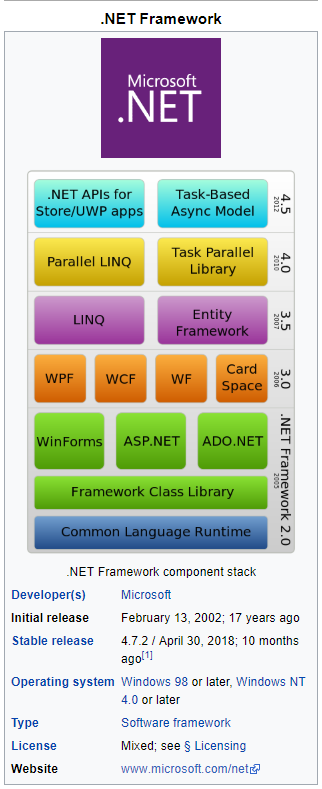
For .NET
JAX-WS Annotations
- @WebService. This JAX–WS annotation can be used in 2 ways.
- @SOAPBinding. Demonstration of @SOAPBinding JAX–WS annotationhas already been shown in first program
- @WebMethod. @WebMethod JAX–WS annotation can be applied over a method only.
- @WebResult.
- @WebServiceClient.
@WEBSERVICE
This JAX-WS annotation can be used in 2 ways. If we are annotating this over a class, which means that we are trying to mark the class as the implementing the Web Service, furthermore Service Implementation Bean (SIB). Or we are marking this over an interface, it means that we are defining a Web Service Interface (SEI), in other words Service Endpoint Interface.W
@SOAPBINDING
This annotation is used to specify the SOAP messaging style which can either be RPC or DOCUMENT. The encoding style of message sent to and fro while using the web service is represented by this style.
With RPC style a web service is capable of only using simple data types like integer or string. Furthermore, DOCUMENT style is capable of richer data types for a class as an example Person, which can have attributes like String name, Address address etc.
Document style indicates that in the underlying web service, moreover underlying message shall contain full XML documents, whereas in the RPC style, the underlying message contains parameters and return values in request and response message respectively. By default the style is Document.
Use is the other important optional attribute . It represents the formatting style of the web service message. Furthermore its value can either be literal or encoded.
Example
@SOAPBinding(style=Style.DOCUMENT, use=Use.LITERAL)
@WEBMETHOD
@WebMethod JAX-WS annotation can be applied over a method only. Furthermore this specified that the method represents a web service operation.
@WEBRESULT,
Elements to @WebResult are WebParam.Mode which defines the direction in which parameter is flowing, moreover targetNamespace is used to define XML namespace for the parameter.
@WEBSERVICECLIENT
Web Service Testing,
Web Services Testing is testing of Web services and its Protocols like SOAP & REST. To test a Webservice need to follow these.
- Test Manually
- Create your own Automation Code
- Use an off-the shelf automation tool like SoapUI.
WebService Testing involves following steps –
- Understand the WSDL file
- Determine the operations that particular web service provides
- Determine the XML request format which we need to send
- Determine the response XML format
- Using a tool or writing code to send request and validate the response
If we want to test a WebService which provides Currency Conversion Facility, it will the current conversion rates between the different countries currency. Moreover this service we can use in our applications to convert the values from one currency to the other currency.
REFERENCES
https://www.maxcdn.com/one/visual-glossary/web-application/
https://www.tutorialspoint.com/webservices/what_are_web_services.html
https://www.ibm.com/support/knowledgecenter/SSQ2R2_14.0.0/com.ibm.etools.est.doc/concepts/
https://www.guru99.com/webservice-testing-beginner-guide.html
https://examples.javacodegeeks.com/enterprise-java/jws/jax-ws-annotations-example/

 Dev's blog