Content
- Version Controlling
- GIT
- CDN
- Virtualization
Version Controlling
Version Control, Revision Control or Source Code Management, is the management of changes to documents, computer programs, websites or other collection of information.
Benefits
- Version tracking and branching
- Tagging
- Restoring Previous Version
- Collaboration
- Audit
- Easy Integration with IDE and other tools
How to choose a perfect VCS? Look for these…
- Project requirement
- Ease of use
- Documentation
- Portability
- Multi sites vs Single sites
- cost
- Community and support
Available tools
- CVS (Concurrent Version system)
Tortoise CVS, Xcode(Mac) , NetBeans, eclips,Emacs are grate client for CVS.
- SVN( Subversion )
SourceForge, Apache,Python,Ruby and many other large projects use it as a repository.
Some clients are SmartSVN, TortoiseSVN
- GIT
- Microsoft Team Foundation
Even TFS is tailored for Microsoft Visual Studio and Eclipse (on Windows and non-Windows platforms) it can be used as a back end to numerous integrated development environments
- Perforce
- Mercurial
Models of VCS
There are three models of VCS. They are,
- Local version control systems
- Centralized version controlling systems
- Distributed version controlling systems
Let’s further see them,
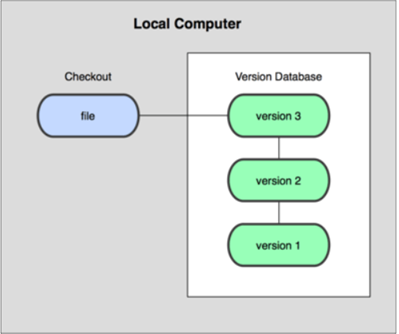
Local Version Control Systems
Track of files within the local system is maintained by Local Version Control System. This approach is very common and simple, furthermore type is also error prone so that the chances of accidentally writing to the wrong file is higher.
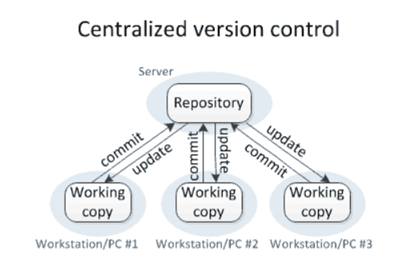
Centralized Version Control System
All the changes in the files are tracked under the centralized server. All the information of versioned files, and list of clients that check out files from that central place, includes in the centralized server.
Example: Tortoise SVN
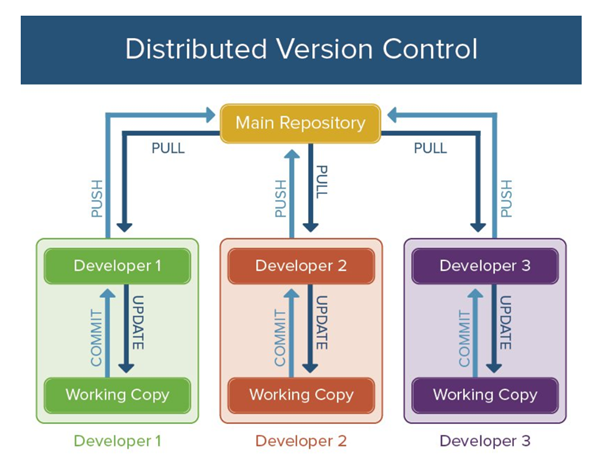
Distributed Version Control System.
Distributed version control systems come into picture to overcome the drawback of centralized version control system. Including its full history, clients completely clone the repository .If any server dies, any of the client repositories can be copied on to the server which help restore the server.
Every clone is considered as a full backup of all the data.
Example: Git
GIT & GitHub
Most common mistake! Git & GitHub are same or different?
Git is a free and open source distributed version control system designed to handle everything from small to very large projects with speed and efficiency.
Git is easy to learn and has a tiny footprint with lightning fast. It outclasses SCM tools like Subversion, CVS, Perforce, and ClearCase with features like cheap local branching, convenient staging areas, and multiple workflows.
GitHub is a Git repository hosting service, which contains many of its own features. Even though Git is a command line tool, GitHub provides a Web-based graphical interface. Furthermore it provides access control and several collaboration features, such as a wikis and basic task management tools for every project.
Git commands,COMMIT and PUSH
Since git is a distributed version control system, the difference is that commit will commit changes to your local repository, whereas push will push changes up to a remote repo. git commit record your changes to the local repository. git push update the remote repository with your local changes.
How to do GIT “commit” and “push”?
- install and configure Git locally
- create your own local clone of a repository
- create a new Git branch
- edit a file and stage your changes
- commit your changes
- push your changes to GitHub
- make a pull request
- merge upstream changes into your fork
- merge changes on GitHub into your local clone
Staging area & Git directory
The Git index is used as a staging area between your working directory and your repository. Index can be used to build up a set of changes that needed to commit together. When creating a commit, what is committed is what is currently in the index, not what is in the working directory.
A step before the commit process in git is Staging. A commit in git is performed in two steps; staging and actual commit. As long as a change set is in the staging area, git allows to edit it as like (replace staged files with other versions of staged files, remove changes from staging, etc.).
git directory is a bare repository (without its own working tree), By pushing into it and fetching from it, that is typically used for exchanging histories with others.
CDN
A Content Delivery Network (CDN) is an interconnected system of computers on the internet that provides web content rapidly to large number of users by duplicating or caching the content on multiple servers and directing the content to users on proximity.
Benifits of CDNs
- Server Load will decrease
The companies can have an increase in capacity and number of concurrent users that they can handle, as a result of, strategically placed servers which form the backbone of the network . Essentially, the content is spread out across several servers, as opposed to offloading them onto one large server.
- Content delivery will become fast
Operators can deliver high-quality content with a high level of service due to higher reliability, low network server loads, and thus, lower costs. Moreover, jQuery is ubiquitous on the web. There’s a high probability that someone visiting a particular page has already done that in the past using the Google CDN. Therefore, the file has already been cached by the browser and the user won’t need to download again.
- Segmenting audio becomes easy
Depending on the kind of device requesting the content, CDNs can deliver different content to different users . They are capable of detecting the type of mobile devices and it can deliver a device-specific version of the content.
- Lower network latency and packet loss
CDN users can, deliver high definition content with high Quality of Service, low costs, and low network load, because end users experience less jitter and improved stream quality.
- Higher availability and better usage analytics
CDNs dynamically distribute assets to the strategically placed core, fallback, and edge servers. CDNs can give more control of asset delivery and network load. They can optimize capacity per customer, provide views of real-time load and statistics, reveal which assets are popular, show active regions and report exact viewing details to customers. even with large power, network or hardware outages, CDNs can thus offer 100% availability,
- Storage & security
CDNs offer secure storage capacity for content such as videos for enterprises that need it, as well as archiving and enhanced data backup services. CDNs can secure content through Digital Rights Management and limit access through user authentication.
CDNs and web hosting server
CDN is short for content delivery network. A content delivery network (CDN) is a system of distributed servers that deliver pages and other Web content based on the geographic locations of the user.
How it’s working?
Servers nearest to the website visitor respond to the request. By caching the contents of the page The content delivery network copies the pages of a website to a network of servers that are dispersed at geographically different locations. When a user requests a webpage that is part of a content delivery network, the CDN will redirect the request from the originating site’s server to a server in the CDN that is closest to the user and deliver the cached content. CDNs will also communicate with the originating server to deliver any content that has not been previously cached.
The process of bouncing through CDNs is nearly transparent to the user. If the delivered URL is different than the URL, that has been requested only, the user able to know if a CDN has been accessed.
What is web hosting?
Web hosting is a service that allows organizations and individuals to post a website or web page onto the Internet.
web hosting service provider, is a business that provides the technologies and services needed for the website or webpage to be viewed in the Internet.
Free and commercial CDNs,
1. CloudFlare
CloudFlare is popularly known as the best free CDN for WordPress users. Moreover it is one of the few industry-leading players that actually offer a free plan. Powered by its 115 datacenters, CloudFlare delivers speed, reliability, and protection from basic DDoS attacks. Furthermore it’s WordPress plugin is used in over 100,000 active websites.
Photon by Jetpack

To all WordPress users – Jetpack needs no introduction. In their recent improvement of awesomeness, they’ve included a free CDN service (called Photon) that serves your site’s images through their globally powered WordPress.com grid. Furthermore to get this service activated, all you have to do is download and install Jetpack and activate its Photon module.

Incapsula provides Application Delivery from the cloud: Global CDN, Website Security, DDoS Protection, Load Balancing & Failover. It takes 5 minutes to activate the service, moreover they have a great free plan and a WordPress plugin to get correct IP Address information for comments posted to your site.
5. AWS Cloudfront
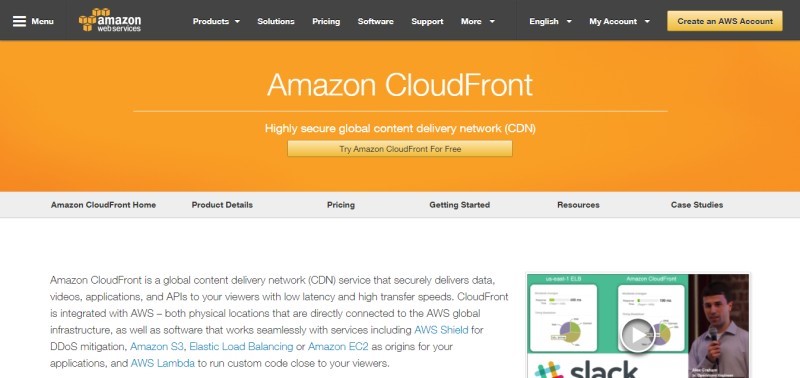
Amazon Web Services (AWS) is a pioneer in bringing high performance cloud computing to the masses at an affordable rate. One of their services is Amazon CloudFront an industry-leading content delivery network used by the likes of Slack and Spotify!
To top that off, they have a free usage tier of one full year. And the quota? 50GB of outbound transfer over the trial period. This is definitely a must-try for all WordPress enthusiasts.
How do you get started?
Google Cloud CDN

Similar to AWS, Google Cloud offers $300 USD credits over a one-year duration, with access to their Cloud CDN platform. We’ve covered how to install WordPress on Google Cloud in the past. Moreover Today, there are one-click solutions to deploy WordPress (and other leading CMS) across multiple cloud providers.
7. Microsoft Azure CDN
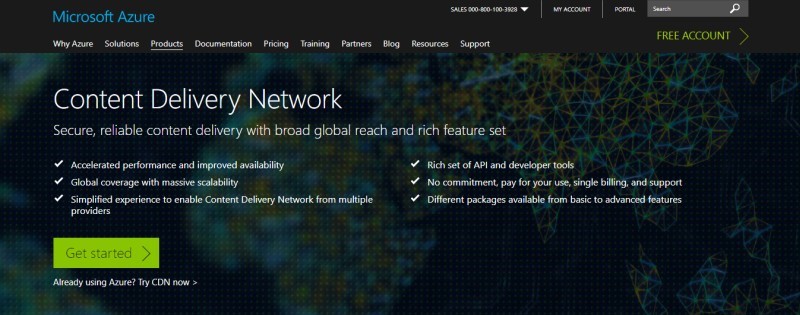
Microsoft Azure currently (i.e. July 2017) offers a 30-day trial of its services with $200 USD worth of credits. Furthermore The Azure CDN is available in multiple datacenters across the globe.
8. Cloudinary
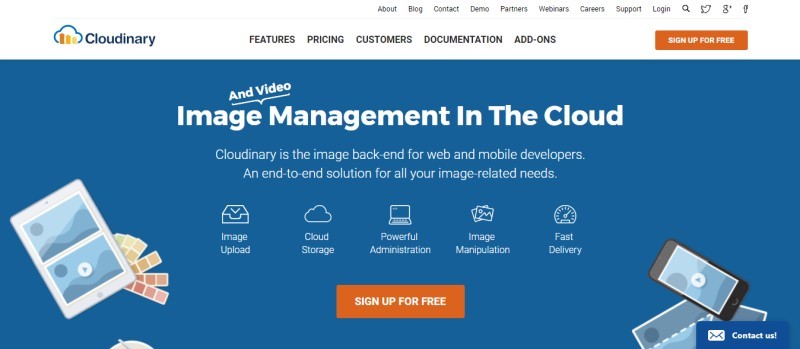
If you run website that heavily dependent on images (think portfolios of photography/design services), offloading your images to another server would be a good idea. You would end up saving a lot of precious bandwidth. Moreover Cloudinary is a robust image management solution that can host your images, resize them on-the-fly and a ton of other cool features. Moreover in their forever-free plan, they offer 2GB storage with 5GB of bandwidth.
9. Imgur

A wildly-popular image hosting site, which is fast, reliable and perfect for beginners. If you’re just starting up and looking for an easy way to save server bandwidth, imgur along with other popular image hosting sites like PhotoBucket and Flickr should serve your purposes to the fullest
Virtualization
Requirements for virtualization,
- Processor that supports Intel VT-X
- Minimum 2 GB Memory (NAS reserves 1.5 GB Memory): TS-x51 series (Please note: If TS-x51 series want to run Virtualization Station, please install a significant amount of memory. )
- Minimum 4 GB Memory (NAS reserves 2 GB Memory): TS-x70, TS-x70 Pro, TS-ECx80 Pro, TS-x70U-RP, TS-x79U-RP, TS-ECx79U-RP, TS-ECx79U-SAS-RP, SS-ECx79U-SAS-RP and TS-ECx80U-RP series
(Please note: If you want to run the Virtualization Station on the TS-x70 and TS-x70 Pro series, please contact us) - Minimum 550 MB Hard disk space
- Minimum two Ethernet cables (Note: The network usage of Virtualization Station is separated from the Turbo NAS. One is for the Turbo NAS to use and the other is for virtual machines to use)
- Supported NAS series:TS-x51/TS-x51-4G, TS-x70, TS-x70 Pro, TS-x70U-RP, TS-x79U-RP, TS-ECx79U-RP, TS-ECx79U-SAS-RP, SS-ECx79U-SAS-RP, TS-ECx80 Pro and TS-ECx80U-RP, series (Please note: If you want to run the Virtualization Station on the TS-x70 and TS-x70 Pro series,
Different Types of Virtualization,
- Hardware/Server Virtualization.
- Network Virtualization.
- Storage Virtualization.
- Memory Virtualization.
- Software Virtualization.
- Data Virtualization.
- Desktop virtualization.
Hypervisor,
A hypervisor or virtual machine monitor (VMM) is computer software, firmware or hardware that creates and runs virtual machines. A computer on which ahypervisor runs one or more virtual machines is called a host machine, and each virtual machine is called a guest machine.
Emulation vs VMs,
Virtual machines make use of CPU self-virtualization, to whatever extent it exists, to provide a virtualized interface to the real hardware. Emulators emulate hardware without relying on the CPU being able to run code directly and redirect some operations to a hypervisor controlling the virtual container.
VMs and containers/dockers,
Containers also provide a way to isolate applications and provide a virtual platform for applications to run on (see figure, b). Two main differences exist between acontainer and a hypervisor system. … A hypervisor, on the other hand, runs VMsthat have their own operating system using hardware VM support
Difference between Global and local configuration?
Global variables are declared outside any function,and they can be accessed(used) on any function in the program.
Local variables are declared inside a function , and can be use only inside that function.
- Git repository,
- can set a git username only for a single repository on the computer.
- $ git config user.name “Sliit”
- then need to confirmit as,
- $ get config user.name
- >Sliit
Git Username and GitHub username
The Git username is not as github username. The new name you set will be visible in any future commits you push to GitHub from the cmd line.
Most references for your repositories under the old username automatically change to the new username.
commits made with your username@users.noreply.github.com email address will no longer be associated with your account.
If you’d like to keep your real name private, you can use any text as your Git username.
Setting your Git username for every repository on your computer
- Open Git Bash.
- Set a Git username:
$ git config –global user.name “Sliit”
- Confirm that you have set the Git username correctly:
- $ git config –global user.name
>Sliit
Setting your Git username for a single repository
- Open Git Bash.
- Change the current working directory to the local repository where you want to configure the name that is associated with your Git commits.
- Set a Git username:
$ git config user.name “Sliit”
- Confirm that you have set the Git username correctly:
- $ git config user.name
>Sliit

 Dev's blog